Shopify Shipping Cost Tool to Track What You Actually Spend
Shopify won't report what you actually spend on shipping labels. See how a Shopify shipping cost tool tracks real label cost per order and your true profit.
You charge $16 flat for shipping, with free shipping on orders over $100. At the end of the month, you want to answer one simple question: how much did I actually spend on shipping labels?
Shopify won't tell you.
Pull the reports and every free-shipping order shows $0 shipping, including the ones where you paid $14 for the label yourself. Your flat-rate orders show $16 whether the label cost you $6 or $19. The only place the real number lives is inside each order, one at a time.
So you build a Google Sheet and add it up by hand. That works at 80 orders a month. At 800, it falls apart.
If that's you, you're not doing it wrong. Shopify's built-in reports don't put this number in one place, and the section below shows exactly why. This post covers how shipping costs and reports actually work in Shopify, what the gaps are costing you, and how a Shopify shipping cost tool closes them, so you can see your real shipping spend and your true profit without touching a spreadsheet.
TL;DR
Shopify reports what you charged customers for shipping, not your full cost. Free-shipping orders show $0 on the revenue side.
Shopify's label reports cover only labels bought through Shopify Shipping and leave out carrier adjustments, so they undercount real spend.
Nothing native nets cost against revenue or ties shipping to per-order profit, which is why manual spreadsheets take over (and break at scale).
Untracked shipping is a real margin leak. Shipping, fulfillment, and returns run roughly 12 to 20% of revenue for most DTC brands.
Bloom tracks label costs on Shopify, pulls carrier costs from your shipping apps, adds cost rules at order and product level, and folds it all into true profit.
How Shipping Costs Work in Shopify
Shopify decides what your customer pays for shipping through shipping profiles, under Settings, then Shipping and delivery. Inside a profile you group products and set rates by zone. You get three main rate types: flat rate, carrier-calculated, and free shipping. Every one of them controls the charge shown at checkout, not what you pay the carrier.
Here is what each does:
Flat rate: a fixed fee you set, applied once per order. You can vary it by order price or total weight, for example $0 to $100 → $12, over $100 → free.
Carrier-calculated: live rates from carriers like USPS, UPS, or FedEx, shown at checkout based on weight and destination. Connecting your own carrier accounts requires certain plans or an added fee.
Free shipping: a flat rate set to $0, either on everything or above an order-value threshold.
Condition-based rates let you tier by weight or order price. Native Shopify does not tier by item quantity, which is the gap most merchants hit next.
How to Add Shipping Cost per Item in Shopify
Shopify has no true per-item shipping field. Flat rates apply once per order no matter how many items are in the cart, so to charge by item you either build weight-based tiers that scale as the cart grows or use a third-party shipping rate app. The native path:
Go to Settings, then Shipping and delivery.
Open the shipping profile you want (or create one for the products that need their own rates).
Add a rate, and choose a condition based on weight or order value.
Set tiers that climb with the order, for example 0 to 1 kg → $7, 1 to 2 kg → $14, 2 kg and up → $21, using weight as a stand-in for quantity.
Save, then test a multi-item cart at checkout to confirm the right rate applies.
For genuine per-unit pricing, a dedicated shipping rate app gives cleaner control than Shopify's weight workaround. Either way, remember what this controls: the customer charge. It still says nothing about what the order cost you to ship.
What Shipping Reports does Shopify Give You?
Shopify splits your shipping data into two separate reports, and neither shows your true cost per order. The finance "Shipping by order" report shows what customers paid and excludes your label purchases. The "Shipping Labels" and "Shipping Labels Over Time" reports show what you paid, but only for labels bought through Shopify Shipping. Nothing nets the two together or ties either to profit.
So the picture comes in halves. One report holds your shipping revenue. Another holds part of your shipping cost. That split creates three gaps that matter:
Free-shipping orders read as $0 on the revenue side. The "Shipping by order" report shows the customer charge, so a free-shipping order shows nothing, even though you bought a label. This is the problem most merchants notice first.
The label reports only count Shopify Shipping labels. Buy postage through a third-party app and those costs never appear in Shopify's label reports at all.
Carrier adjustments are excluded. Carriers routinely correct charges after the fact for weight or dimensions. One merchant bought 11 labels for $86.73 and was billed $146.50 once adjustments landed. Shopify's label reports leave those out, so the report undercounts what you actually paid. Your billing statement is the most accurate source, but it isn't built for per-order profit analysis.
The cost lives in pieces, across reports that don't talk to each other, none of which answer the real question: what did this order, and this product, actually cost me to ship, and did it still make money?
Free shipping widens every one of these gaps. It is a marketing decision that quietly moves the shipping cost from your customer to you, and that absorbed cost never lands as a clean line anywhere you look day to day.
What Untracked Shipping Really Costs You
Shipping is usually the second-biggest variable cost in a DTC business after the product itself, and it is the one most operators track least precisely. Revenue can look healthy and gross margin can look fine while shipping quietly eats the difference between "we're growing" and "we're making money."
Here is the scale of it. Industry benchmarks put shipping at roughly 5 to 15% of revenue, with apparel brands often near 12 to 13% and lighter, higher-ticket categories lower. Free shipping alone typically costs 4 to 8% of order value. Add fulfillment and returns and the combined load reaches 12 to 20% of revenue for many brands.
A single order shows how it hides. On a $75 order with an $8 carrier cost, a free-shipping promise means you absorb that $8 yourself, around an 11% hit on that order. Your dashboard still records it as a clean $75 sale with $0 shipping. The margin is gone, but nothing on the screen says so.
This is where contribution margin matters. CM2 (contribution margin after ads and fulfillment) is what's left from each order after you subtract the product cost, the shipping, and the ad spend that brought the order in. It is the number that tells you whether an order actually made money. If your shipping cost is wrong or missing, your CM2 is wrong, and every decision built on it (pricing, free-shipping thresholds, which products to push) is built on a bad number.
How to Track Shopify Shipping Costs Manually (and why it stops working)
The manual method is the one the merchant above was using, and plenty of stores start there. It works like this:
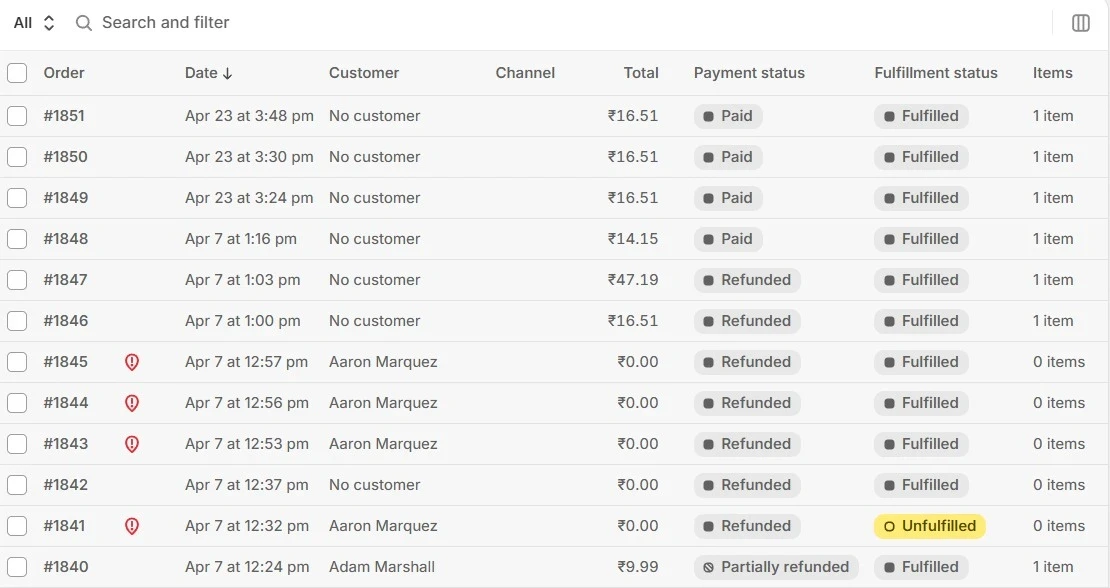
Open each order in your Shopify admin.
Find the label cost in the order timeline where you bought it.
Log it in a spreadsheet, tagging free-shipping and flat-rate orders separately.
Total the column at the end of the month.
At low volume with simple shipping, this is fine. You get a real number, and it costs you an hour.
It breaks for predictable reasons. The time scales linearly with orders, so the faster you grow, the further behind you fall. Manual entry introduces errors. You get one blended monthly total but no view of which products or which order types are the expensive ones. And the number sits in a spreadsheet, disconnected from your profit, so it tells you what you spent but not what it did to your margin.
The moment you cross a few hundred orders a month, the spreadsheet stops being a tool and starts being a tax on your time.
What a Shopify Shipping Cost Tool Should Do
If you are evaluating an app to solve this, here is the checklist worth holding it to. A shipping cost tool should:
Pull the actual label cost per order automatically, including the free-shipping orders that show $0 in native reports.
Produce a monthly total shipping spend report without manual entry.
Let you set cost rules (fixed, weight, quantity, or order value) at the order and product level, so orders without a live label cost still carry an accurate figure.
Break shipping down by product and by order, not just a single blended total.
Feed shipping straight into true profit and contribution margin, so the cost connects to the decision instead of living in isolation.
Scale without adding work as your order volume grows.
The first and last points are the ones that separate a real solution from a fancier spreadsheet. If you still have to touch every order, you haven't solved the problem you started with.
Shopify Native Reports vs. Spreadsheet vs. Profit Tool
What you need | Shopify native reports | Manual spreadsheet | Shipping cost tool |
Shows what the customer was charged | Yes | Yes | Yes |
Shows your actual label cost | Shopify labels only | Yes, by hand | Yes, all sources |
Captures carrier adjustments | No | If you catch them | From carrier/app data |
Cost on free-shipping orders | Hidden on revenue report | Logged manually | Captured |
Total in one place, netted | Split across reports | Yes, by hand | Yes |
Cost by product and order | No | Limited | Yes |
Ties shipping to true profit (CM2) | No | No | Yes |
Keeps up as you scale | n/a | No | Yes |
How Bloom Tracks Your True Shipping Cost
Bloom, our profit app is built around this exact problem, you can't manage shipping spend you can't see.
It works in two layers. First, Bloom tracks your label costs and pulls carrier costs from your connected shipping apps, so the free-shipping order that cost you $14 shows $14, not $0. The order that looked free to the customer is no longer free in your numbers. Second, you can set cost rules to reflect how you actually fulfill, including fixed, weight-based, quantity-based, and order-value-based rules at both the order and product level, with multiple conditions layered together for accuracy.
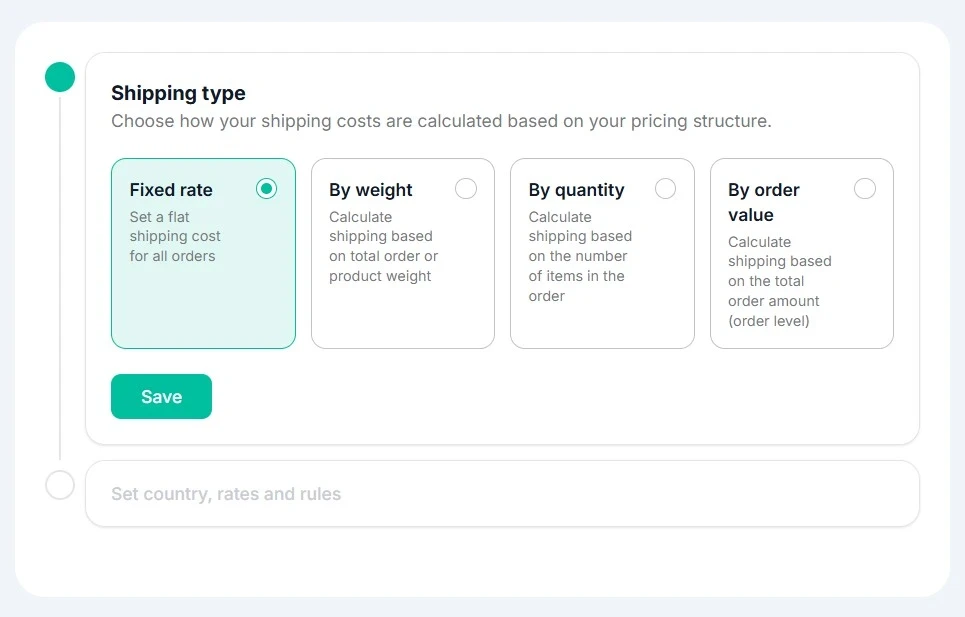
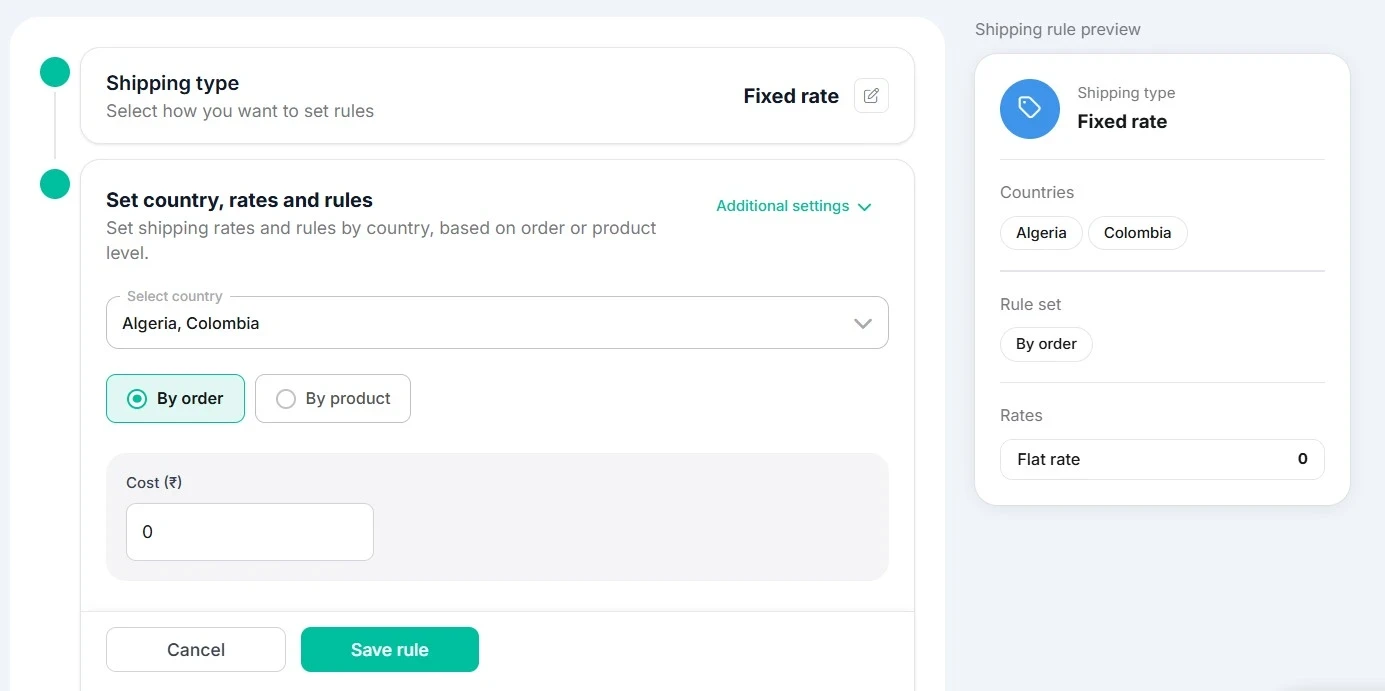
The result is the report the merchant was rebuilding by hand. Total shipping spend for the month, in one place, without opening a single order. And because shipping flows into your profit view, it lands where it belongs: inside contribution margin and net profit, broken out by product and order so you can see which ones are quietly costing you the most.
That last part is the difference between knowing your shipping spend and acting on it. A monthly total tells you the bleeding exists. A per-product, profit-connected view tells you where it is.
A Worked Example
Take a representative store doing $200K a month, with $16 flat-rate shipping and free shipping over $100. Say it ships 1,000 orders, and 400 of them qualify for free shipping. The average label costs $11.
Here is what each view shows.
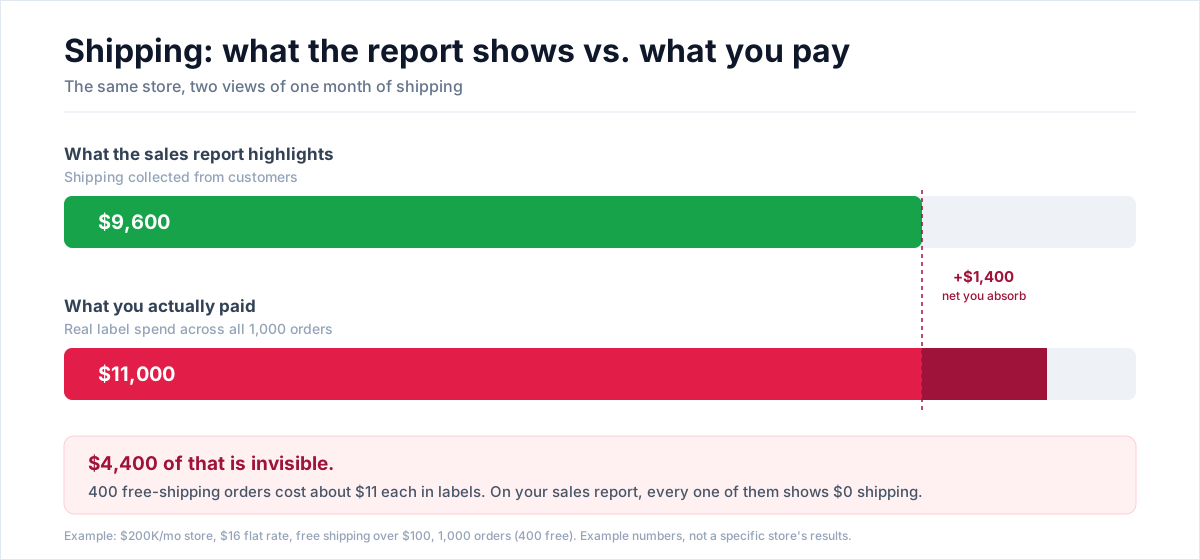
Shopify's sales reports show shipping income of about $9,600 (the 600 paid orders at $16) and no matching cost line, since label costs live in a separate report. Glance at the sales view and shipping looks like a positive line.
Reality: actual label spend is 1,000 orders times $11, or $11,000. So shipping is not a $9,600 gain, it is a $1,400 net drain once you net the collected fees against what you paid. At $200K revenue, that $11,000 in label spend is about 5.5% of revenue, squarely in the normal range, which is the point. It is not an emergency number. It is an invisible one.
Worse, the 400 free-shipping orders each absorb roughly $11 of margin that never appears anywhere. If a chunk of those are low-margin products, some of those orders lost money the moment they shipped, and nothing in the native dashboard would tell you.
Frequently Asked Questions
Does Shopify Show How Much I Spend On Shipping Labels?
Partly. Shopify's "Shipping Labels" and "Shipping Labels Over Time" reports show costs for labels bought through Shopify Shipping. They exclude carrier adjustments and any labels bought through third-party apps, and they sit apart from your sales data. So they show some of your cost, but not your true, complete shipping cost or the profit on each order.
How Do I Get A Monthly Shipping Cost Report On Shopify?
The "Shipping Labels Over Time" report gives a monthly view of label costs, but only for labels purchased through Shopify Shipping, and without carrier adjustments. For a complete figure that includes third-party labels and adjustments, and that ties to profit, you either total it by hand in a spreadsheet or use a shipping cost tool that pulls cost from every source and rolls it up automatically.
Why Do My Shopify Reports Show $0 Shipping On Some Orders?
Because those orders had free shipping, so the customer paid nothing, and Shopify reports the customer charge rather than your label cost. Even though you bought and paid for a label, the report shows $0. This is the single most common reason store owners underestimate their real shipping spend and overstate their profit.
Does Shopify Charge Shipping Per Item?
Not by default. Flat rates apply once per order regardless of how many items are in the cart. To charge shipping for each product, you need to set up separate shipping rates or use a third-party app. Note that this controls what the customer pays at checkout, which is separate from tracking what shipping actually costs you.
Can A Shipping Cost Tool Connect Shipping To My Profit?
Yes, and that is the main reason to use one over a spreadsheet. A spreadsheet gives you a total in isolation. A profit-focused tool attributes the real shipping cost to each order and product, then folds it into your contribution margin, so you can see not just what you spent but which orders and products it made unprofitable.
Know Your Real Profit And
The Ads That Actually Sell.
No need to spend. Just try it on your store.