How to Use Chatgpt As Your Shopify Profit Analyst
Connect Shopify to ChatGPT through Bloom to investigate profit, evaluate marketing, and get answers in plain English. Full setup guide inside
The ChatGPT Shopify integration is bringing AI closer to everyday ecommerce workflows, from content creation and product discovery to customer support, store management, and reporting.
But what if ChatGPT could do more than help run your store? What if it could act like a Shopify profit analyst, helping you understand what is driving profit, where you're losing money, and which opportunities deserve your attention?
A profit analyst is only as good as the information available to them. The same is true for AI. To answer profitability questions, ChatGPT needs access to more than orders, products, and sales data. It needs the business context behind the numbers.
This guide shows how to connect Shopify to ChatGPT through Bloom Analytics, giving AI the data it needs for deeper profitability analysis and more actionable insights.
TL;DR
A ChatGPT Shopify integration lets you ask questions about your store in plain English instead of building reports.
ChatGPT becomes useful as an analyst only when it can read accurate profit, cost, and marketing data, not just raw Shopify orders.
Shopify data alone answers "what happened" questions. Profit, margin, and attribution questions need a layer like Bloom on top.
Bloom connects to ChatGPT through MCP, an open standard that gives the model secure, live access to your numbers.
Setup takes a few minutes, no code required, and you can revoke access at any time.
Use ChatGPT to investigate drops, compare periods, evaluate channels, and spot opportunities. The decisions, however, remain yours.
Why Most Shopify Merchants Cannot Turn Data Into Decisions
Most DTC founders are not short on dashboards. Shopify has sales and order data. Meta and Google have ad reports. Klaviyo tracks email revenue. Shipping costs live elsewhere. COGS often sits in a spreadsheet.
The problem is that the answers merchants need rarely live in one place. Margin, attribution, and profitability all depend on connecting data across multiple systems.
A question like "Why did profit drop last week?" quickly becomes a multi-step investigation. Did revenue fall, or did costs rise? Was it ad spend, shipping, or product costs? And did the additional spend actually generate profitable orders?
Larger brands often have analysts to answer these questions. Smaller brands usually do it themselves. Either way, the process is slow, and slow analysis leads to slow decisions.
AI can help close that gap, on demand, for far less effort. But only if it has access to the right data.
What It Means to Use ChatGPT as a Shopify Business Analyst
Most merchants already use ChatGPT for ad copy, product descriptions, or customer support replies. Very few use it for analysis. That is starting to change.
When ChatGPT is connected to live store data, it stops being a writing assistant and starts behaving like an analyst. You ask a question. It pulls the relevant numbers, reasons through them, and explains what it found in plain language. If the first answer raises a follow-up, you keep asking, the same way you would with a real analyst sitting across the desk.
The reason this works is reasoning. ChatGPT does not just look up a number. It can compare periods, cross-reference categories, weigh trade-offs, and explain trends. Connected to the right data, that reasoning becomes diagnostic.
That raises an obvious question: what data can ChatGPT actually access?
Unlike a traditional Shopify app, ChatGPT doesn't automatically know anything about your store. It's an AI assistant that needs to be connected to business data through a secure standard called MCP, and the quality of its answers depends entirely on what it can read on the other end.
What ChatGPT Can Answer With Shopify Data Alone, and What It Cannot
Shopify exposes a lot through its own APIs and ChatGPT can read most of it once connected. That is useful, but limited. The questions that drive real decisions usually need data Shopify does not own.
Questions ChatGPT can answer with Shopify data alone
How many orders did I get yesterday?
What was my refund rate this quarter?
How many new customers placed an order in the last 30 days?
Which discount codes were used most?
What is my average order value this month versus last?
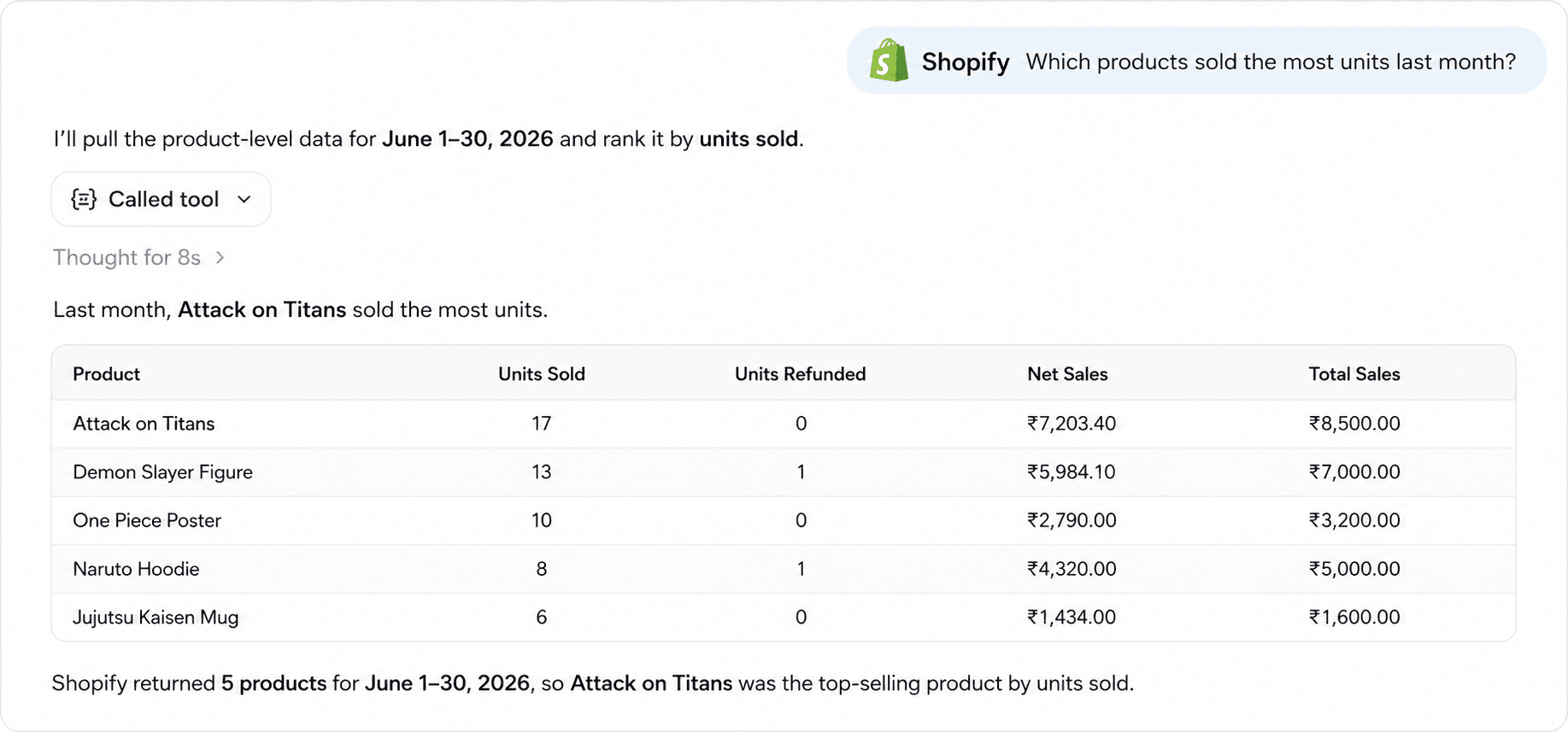
Which products sold the most units last month?
Questions that require a profit and attribution layer like Bloom
What was my actual profit last month after COGS, shipping, fees, and ads?
Which products lose money even though they look like best sellers?
Which marketing channels delivered profitable customers, not just clicks?
What is the gap between Meta's reported ROAS and what my real numbers say?

Which Klaviyo flows are generating profit and which are leaking it through discounts?
What is my contribution margin by country, and where am I losing on shipping?
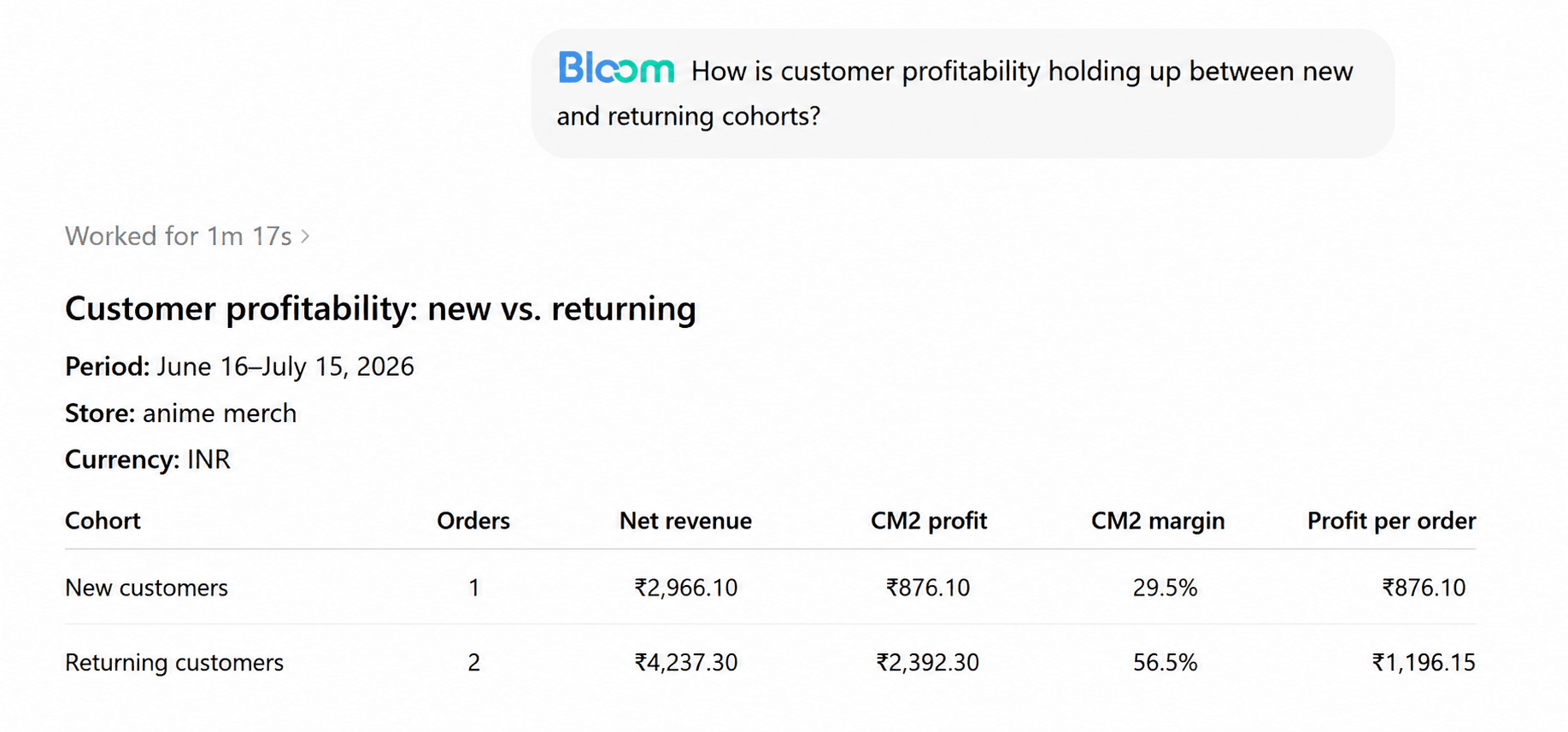
How is customer profitability holding up between new and returning cohorts?
The pattern is clear. Sales activity sits inside Shopify. Profitability sits across Shopify plus everything attached to it. To turn ChatGPT into a real analyst, it needs both.
How Bloom Closes the Data Gap
Bloom, a profit intelligence layer on top of Shopify, pulls in the costs and attribution data that Shopify does not own. Product costs, actual shipping expenses, ad spend across Meta, Google, and TikTok, Klaviyo campaign and flow data, payment processing fees, refunds, and operating expenses all come together with your order data.
The result is a complete picture of what you actually keep. Net profit per order. Contribution margin by product, campaign, and country. Bloom's own ROAS calculation alongside what each ad platform reports. Profit-based customer LTV alongside acquisition cost.
When you connect ChatGPT to that picture through MCP, two things change. ChatGPT can now answer profitability questions, not just sales questions. And because the underlying numbers are consistent, the answers it gives are the same numbers your team is looking at in the Bloom dashboard. There is no "AI version" of your data versus a "real version." It is one source.
How to Connect Shopify to ChatGPT Through Bloom
The setup uses MCP (Model Context Protocol), an open standard that allows AI tools to securely access data from external applications. There's no coding required.
Before you begin, make sure Bloom is installed on your Shopify store and your data sources are connected. Once that's done, the setup only takes a few minutes.
Connecting Bloom to ChatGPT
Open ChatGPT and go to Settings → Apps.
Enable Developer Mode and click Create App.
Give your app a name, such as Bloom.
Open Bloom and copy the MCP Server URL provided in the ChatGPT integration section:
https://app.bloomanalytics.io/mcp.Then paste it into the Server URL field in ChatGPT
Select OAuth as the authentication method.
Review the confirmation prompt and click Create.
Complete the authorization process to connect ChatGPT to your Bloom account.
Once connected, you can access your store's insights, KPIs, profitability metrics, and other key business data directly from ChatGPT through natural-language conversations.
You can revoke the connection at any time from either side. ChatGPT can read your data to answer your questions. It does not change anything in your store, place orders, or edit products.
If you prefer a different AI assistant, the same MCP connection works with Claude. We covered that setup and workflow in detail in our companion guide on how to use Claude to analyze your Shopify profit data.
How to See Profit on Shopify Using ChatGPT
Once connected, the value comes from how you use it. The merchants getting the most out of a ChatGPT with Shopify setup treat it like a real analyst. They ask specific questions, follow up on the interesting answers, and push deeper when something looks off.
Here are four modes worth using, with example ChatGPT prompts for Shopify in each.
Investigating a change in performance
When a number moves and you do not know why, start broad and let ChatGPT narrow it down with you.
Profit dropped 18% week over week. Walk me through what changed.
Revenue grew 12% this month but net profit was flat. What is absorbing the growth?
Refunds spiked in the last 14 days. Which products are driving it and what is the profit impact?
Shipping cost per order is up. Is it a carrier issue, a product mix issue, or both?
Comparing periods, products, and channels
Comparisons are where ChatGPT saves the most time, because it can run several at once and explain the differences rather than just listing the numbers.
Compare this quarter's profitability to last quarter. What are the three biggest movers?
Which 10 products had the highest contribution margin last month, and how did they compare to the top 10 by revenue?
Compare my new customer profit versus returning customer profit over the last 60 days.
How does Meta perform against Google on profit-per-order, not just ROAS?
Evaluating marketing channels and campaigns
This is where the gap between platform-reported numbers and real numbers usually shows up. ChatGPT can put both side by side.
Which campaigns reported a strong ROAS in Meta but lost money after COGS and shipping?
Which Klaviyo flows are generating profit, and which are leaking it through discounts?
What is my blended marketing efficiency this month, and is it improving or declining?
Of the campaigns I am running right now, which would you consider for scaling and which would you pause?
Spotting opportunities you would otherwise miss
The most useful prompts are the open ones, where you let ChatGPT surface what you did not think to look for.
Looking at the last 90 days of data, what is one profit opportunity I am probably missing?
Which countries are quietly profitable and worth more attention?
Are there any products where a small price increase would meaningfully improve margin?
What is one cost line that has grown faster than revenue this year?
Keep notes on the prompts that work. Over a few weeks you will build a set of recurring questions that effectively becomes your weekly review process.
Conclusion
ChatGPT is already a useful ecommerce assistant. With access to the right data, it can become something more valuable: a Shopify profit analyst.
For most DTC merchants, the bottleneck has never been a missing report. It's having the business intelligence needed to answer profitability questions in one place.
That bottleneck is what Bloom removes. A working ChatGPT Shopify integration with Bloom gives AI a complete view of your business and changes the daily rhythm of running a store. Questions get answered in minutes instead of hours. Patterns surface earlier, and decisions happen while the window to act is still open.
If you want to see what this looks like with your own store, Bloom has a free trial that takes a couple of minutes to install on Shopify.
Frequently Asked Questions
Do I Need a Paid Chatgpt Plan to Add Chatgpt to My Shopify Store Through Bloom?
Custom connectors and MCP-based integrations are typically available on ChatGPT's paid tiers rather than the free plan. The Bloom side does not require an upgrade, but you should check your current ChatGPT plan to confirm connectors are available before starting setup. Most active merchants are already on a paid tier for other reasons.
How is this different from Shopify Sidekick or other built-in AI tools?
Shopify Sidekick is built into Shopify and reads Shopify-native data well. It does not see your real profit, ad spend, shipping label costs, or attribution data, because those live outside Shopify. A ChatGPT integration powered by Bloom reads across all of them. The two can coexist. Use Sidekick for store operations and ChatGPT with Bloom for profit and marketing analysis.
Will My Shopify or Bloom Data Be Used to Train Chatgpt?
OpenAI's policy is that business and connector data sent through the API and enterprise products is not used for training by default, and most paid ChatGPT plans follow the same standard. Review OpenAI's data controls for your specific plan to confirm. You can revoke the Bloom connector at any time from inside ChatGPT or from Bloom.
Can Chatgpt Take Actions in My Shopify Store, Like Editing Products or Refunding Orders?
No. The Bloom MCP connection is read-only. ChatGPT can read your numbers and answer questions about them, but it cannot change inventory, edit products, issue refunds, or place orders. All operational actions still happen inside Shopify or Bloom directly.
Is Claude or Chatgpt Better for Analyzing Shopify Data?
The data layer matters more than the model. Bloom connects to both, and both can answer the same profitability questions. ChatGPT is familiar to most merchants and quick for back-and-forth questioning. Claude tends to handle longer, multi-step reasoning chains well. Use whichever you already prefer. Our Claude for Shopify guide covers that setup if you want to compare.
Know Your Real Profit And
The Ads That Actually Sell.
No need to spend. Just try it on your store.