Pinterest attribution is how Pinterest decides which conversions to credit to your ads. It works by looking backward from a conversion (a purchase, add to cart, or page visit) to check whether the user clicked or viewed one of your Pins inside a set time period. That time period is the Pinterest attribution window. By default, Pinterest uses a 1-day view and 30-day click window, and you can extend the window up to 60 days.
Get the attribution window wrong and you scale campaigns on misleading signals: a view-through window can over-credit Pinterest for sales it only nudged, while a window that is too short hides conversions that took days to close.
This guide covers how Pinterest attribution works, the two windows that control it, click-through versus view-through credit, the limits of the model, and how to read the data without fooling yourself.
Key Takeaways
Pinterest attribution credits conversions by looking backward from a conversion to a qualifying ad click or view within the attribution window.
Two separate settings control it: the conversion window (for delivery and optimization) and the attribution window (for reporting).
The default Pinterest attribution window is 1-day view and 30-day click; it can be set up to 60 days.
Click-through attribution measures direct engagement; view-through attribution measures influence and tends to over-credit.
Pinterest offers a single attribution model, so multi-platform advertisers need a separate source of truth to avoid double-counting.
How Pinterest Attribution Works
Pinterest attribution runs on attribution windows. When a conversion happens on your site, Pinterest looks back over a defined period to see whether the customer clicked or viewed one of your Pins. If a qualifying interaction falls inside that window, Pinterest credits the conversion to your ad.
There are two distinct windows, and they do different jobs. Confusing them is the most common reason two Pinterest reports disagree.
Conversion Window (for Delivery and Optimization)
The conversion window determines what conversion data Pinterest uses to optimize ad delivery. These are events such as add to cart, page visit, and checkout etc. A longer window credits more delayed conversions and gives the delivery algorithm more signal; a shorter window focuses optimization on conversions that happen soon after the interaction.

Where to set it: Ads Manager > Conversion Settings > Conversion window.
Attribution Window (for Reporting)
The attribution window defines the period during which Pinterest can credit a conversion to an ad interaction in your reports. Pinterest measures conversions by looking backward from the time of the conversion to determine whether a qualifying click or view occurred inside the selected window.
Every attribution window is expressed as two things: a lookback period (1 day, 7 days, or 30 days) and an engagement type (post-click or post-view).
Common Pinterest Attribution Window Options
Window | What it credits |
7-day click | A conversion if the user clicks your ad and purchases within 7 days. |
1-day view | A conversion if the user views your ad and converts within 1 day. |
30-day click | A conversion for clicks that convert up to 30 days later. |
Click-through vs. View-through Attribution
The engagement type in your attribution window decides whether Pinterest credits a conversion after a click or after a view. The difference matters because view-through credit is far looser than click-through credit.
| Click-through attribution | View-through attribution |
Trigger | User clicks the Pin before converting | User only views the Pin before converting |
What it measures | Direct engagement | Ad influence without a click |
Best for | Performance campaigns | Brand awareness campaigns |
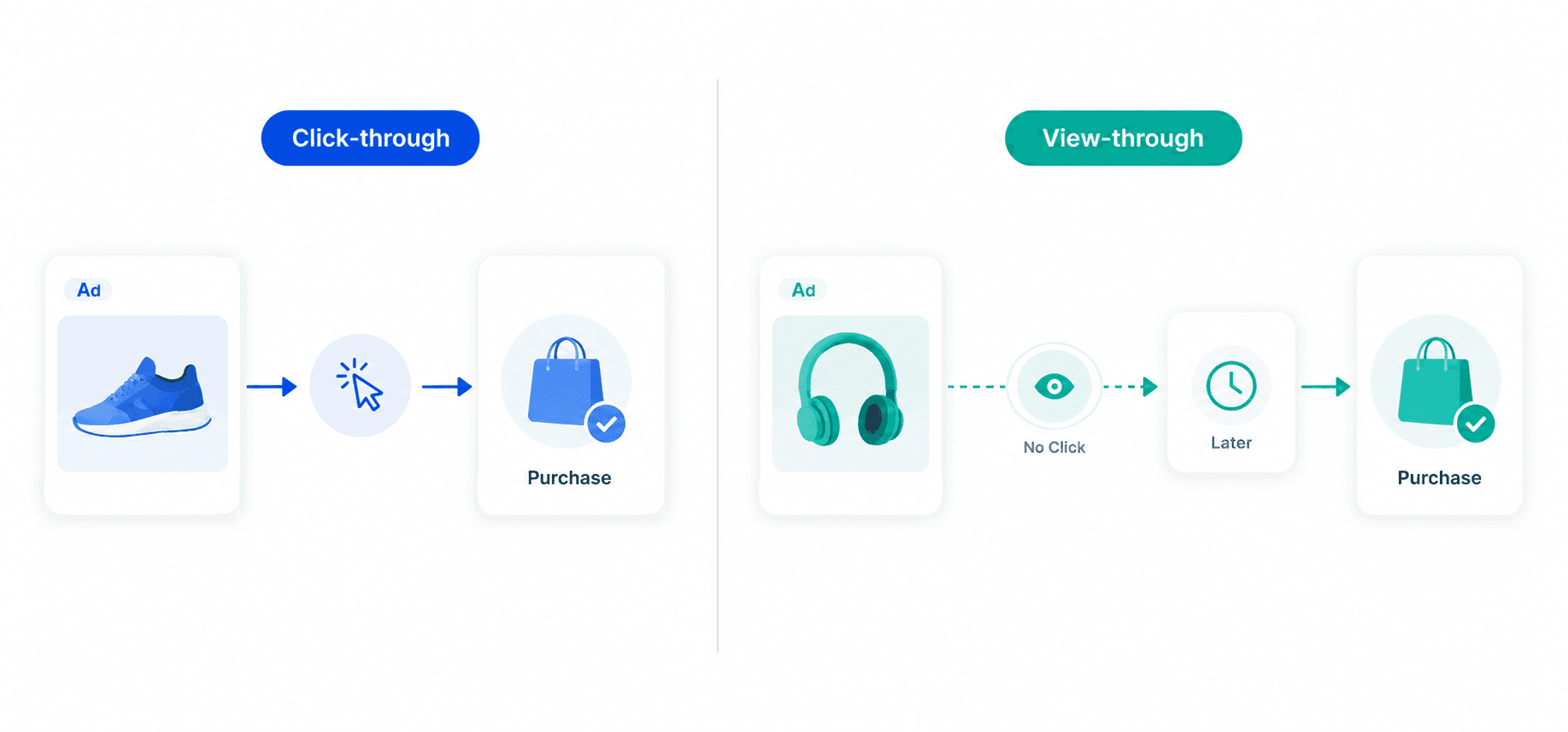
Rule of thumb: for performance campaigns where you care about direct response, lean on click-through numbers. Treat view-through conversions as a softer influence signal, not proof the ad drove the sale.
How the Pinterest Tag works
The Pinterest Tag is a JavaScript snippet you install on your site to track visitor actions after they view or interact with your Pinterest ads. This process, called conversion tracking, attributes on-site actions back to your ads.
It records events including PageVisit, ViewContent, AddToCart, Checkout, Purchase, and SubmitApplication, which lets you evaluate campaign performance and optimize your strategy. Note that the Pinterest Tag is available only in a limited set of countries, so check Pinterest's supported-country list before you rely on it.
How to Choose Your Pinterest Attribution Window
The right window depends on what you are trying to measure, not on which number looks best.
Use a longer window when your customers take time to buy. It captures delayed conversions and shows the fuller impact of a campaign.
Use a shorter window when you only want to measure immediate campaign impact. It reduces the number of delayed conversions that receive credit, which suits fast-response analysis.
Whatever you choose, keep it consistent across campaigns you compare. Changing the window mid-analysis is a fast way to draw the wrong conclusion.
Limitations of the Pinterest Attribution Model
Every attribution model has blind spots, and Pinterest's has a few worth knowing before you scale on its numbers.
Single model: Pinterest offers one attribution model, so it is hard to cross-check conversions against an alternative view.
Limited country coverage: because the Pinterest Tag is available only in some countries, advertisers outside that list cannot track ad performance accurately.
No native multi-platform view: if you run ads on several platforms, you cannot tell which platform generated a conversion without multi-touch attribution outside Pinterest.
Cross-device and iOS privacy: device switching and iOS privacy restrictions stop Pinterest from tracking the exact conversion path.
View-through over-crediting: view-through attribution can inflate Pinterest's contribution, which leads to confident scaling on shaky numbers.
Bottom Line
If you advertise on one platform only, you do not need multiple attribution models to judge performance. But most brands now run ads across several platforms, and standard single-platform attribution struggles there, especially as third-party cookies and browser restrictions keep degrading tracking accuracy.
For Shopify stores, Bloom takes a different approach by using first-party pixels to improve attribution reliability and combining advertising spend with business expenses to provide a profitability view alongside attributed revenue. This helps merchants evaluate which campaigns contribute most to the business, rather than focusing only on attributed sales. If your store runs on another ecommerce platform, look for tools like bloom that offer similar first-party attribution and profitability analysis.

Frequently Asked Questions
What is the default Pinterest attribution window?
By default, Pinterest uses a 1-day view and 30-day click attribution window. You can adjust it and set a window of up to 60 days in Ads Manager under Conversion Settings.
What is the difference between the conversion window and the attribution window?
The conversion window controls what data Pinterest uses to optimize ad delivery. The attribution window controls how conversions are credited in your reports. They are set separately and can differ.
What is the difference between click-through and view-through attribution on Pinterest?
Click-through attribution credits a conversion when the user clicks your Pin before converting, measuring direct engagement. View-through attribution credits a conversion when the user only views the Pin, measuring influence and tending to over-credit the platform.
Why do my Pinterest attribution reports differ from other tools?
Different tools use different attribution windows, models, and tracking methods. Pinterest also faces cross-device and iOS privacy limits, so its numbers rarely match a first-party or multi-touch source exactly.
Is the Pinterest Tag available in every country?
No. The Pinterest Tag is available only in a limited set of countries. Advertisers in unsupported countries cannot track ad performance accurately, so check Pinterest's supported-country list first.
Discover More