How to Build a Profitable Shopify Store From Scratch in 2026


Plenty of people start a Shopify store. Far fewer keep it profitable once the reality of running one sets in.
Before launch, the numbers look great. You find a product, run the math, and the margin looks healthy. Then the first orders come in. Advertising costs more than you planned. Fulfillment takes longer and costs more. Returns happen. Fees compound. The spreadsheet that made sense in week one starts lying to you by week four.
A profitable Shopify store isn't built on optimism about what the margins will look like. It's built on an honest read of what they actually are, once every cost is counted. That means making the right calls on niche, pricing, sourcing, and tracking before you ever take an order, and then having the visibility to course-correct as soon as operations change the picture.
This guide walks through how to do that, step by step, so you set the store up to keep money rather than just move it.
Key Takeaways
A profitable Shopify store starts with niche and margin decisions made before launch, not a website refresh after it.
The math that looks good pre-launch almost always shifts once you add real ad costs, fulfillment, and transaction fees. Build pricing for operational reality, not best-case assumptions.
Track profit in three layers: CM1 (after product cost), CM2 (after fulfillment and fees), CM3 (after ad spend). ROAS can look strong while CM3 is negative.
Scale only what's proven profitable by product, country, and campaign. Revenue growth with leaking margins just multiplies the losses.
Bloom pulls real costs directly from your Shopify store so you can see true profit per product without building a spreadsheet every time something changes.
Step 1: How Do You Choose a Niche That's Actually Profitable?
The right niche has real demand, room for a healthy margin, and space to build a brand people return to. That combination is harder to find than most beginners expect. Picking based on what looks fun, or what went viral last week, is how stores stall before they start.
Before you commit, answer four questions honestly:
Is this niche already in demand, or am I hoping to create demand from zero?
Can I build a brand around it, or is it a one-product trend?
Does the math allow a healthy margin after every cost?
Will people still want this in a year?
If a niche fails two or more of those, keep looking. Thin margins on trending products is the fastest route to a busy store that loses money.
Here are some categories with durable demand and real branding room going into 2026:

Beauty and skincare: Korean skincare for dry or oily skin, organic anti-aging, acne kits, vegan lip care
Health supplements and wellness: women's PCOS support, protein gummies, herbal sleep aids, immunity boosters
Jewelry and accessories: minimalist gold pieces, handmade wooden earrings, hair accessories, Gen Z rings
Digital products: Canva and Notion templates, Lightroom presets, niche courses, planners
Phone and tech add-ons: aesthetic cases, magnetic charging docks, gaming triggers, AirPods cases
Pet products: personalized collars, cat furniture, grooming kits, pet travel gear
Home and kitchen: smart organizers, eco-friendly storage, room decor, portable blenders
Fitness and recovery: resistance bands, posture correctors, yoga tools, massage guns
Print-on-demand: themed hoodies, gym tees, couple wear, astrology apparel
Candles, soaps, and fragrance: soy wax candles, luxury soaps, aromatherapy oils
Treat that as a starting menu, not a shopping list. Validate whatever you pick with Google Trends to confirm search demand is steady or rising before you spend a dollar on inventory.
Check your competitors before you commit
Your competitors are free to research. Study their pricing, product positioning, website design, customer reviews, and how they run ads. Their ad copy tells you which angles already work in the niche, which saves you from guessing with your own budget.
Then look for the gaps they leave open. You can usually win on faster or clearer shipping, stronger branding and packaging, better customer service, more compelling offers, or product pages that actually answer buyer questions. Competitor research shows you what the market already rewards and where there's room for a new store to stand out.
Step 2: How Do You Find Products With Healthy Profit Margins?
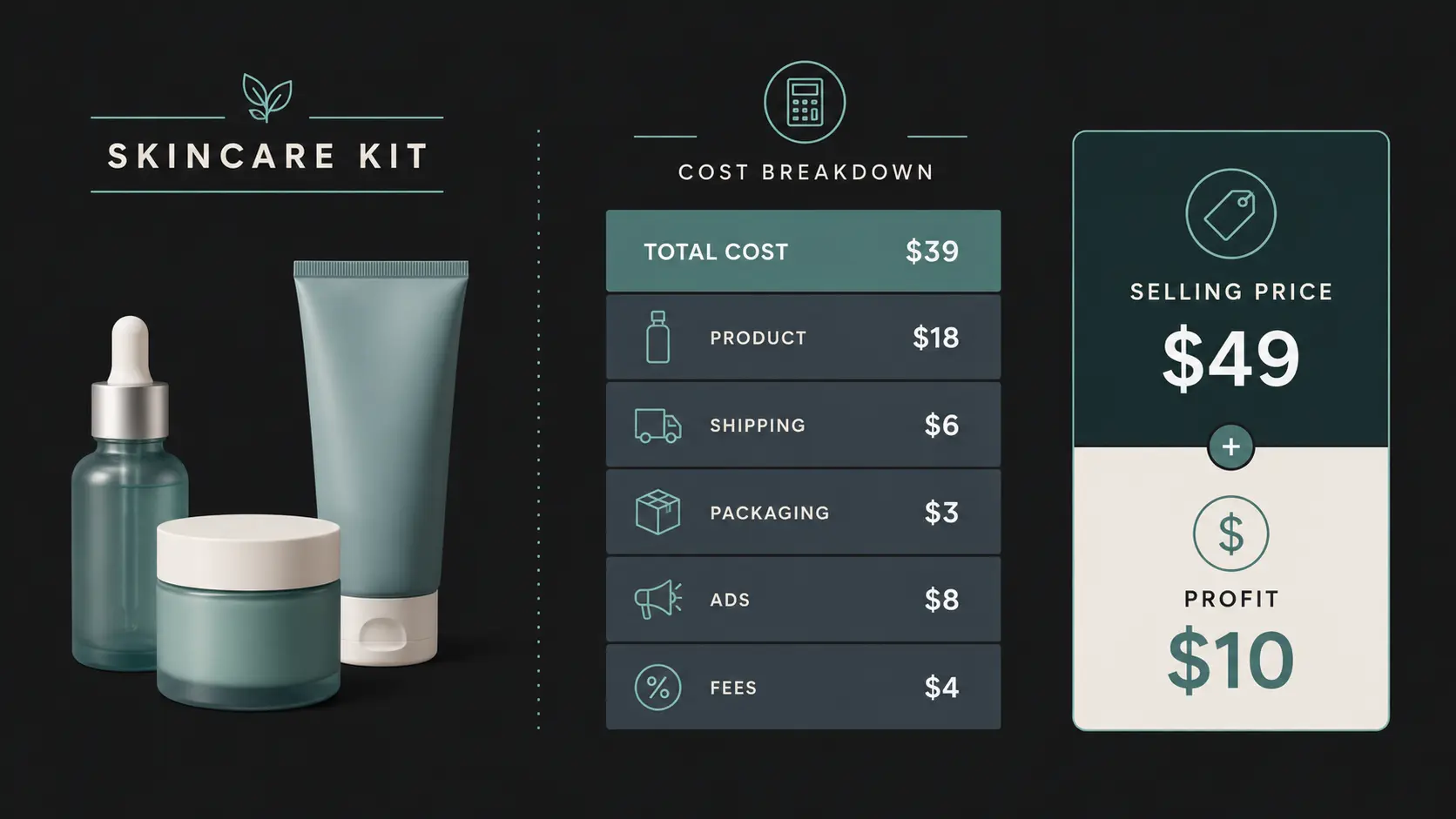
This is the step that decides whether the store survives. The mistake most beginners make is pricing against revenue and discovering too late that each sale is losing money. Before you list a product, add up every cost attached to it: what you pay the supplier, your ad spend per unit, packaging, shipping, transaction fees, and the cost of returns when they happen.
From what we've seen across Bloom merchants, the most common profit leak isn't ad spend, it's specific cost line, e.g., transaction fees + return rate or sometimes the operational costs compounding on thin margins.
The formula to keep in mind:
Net profit = Total revenue minus Total expenses (COGS + shipping + platform fees + handling + ad spend + other marketing + operating expenses)
Here's how thin the margin can get in practice. Say you sell a Korean skincare kit for oily skin:
Cost line | Amount |
Product cost | $20.00 |
Marketing (per unit) | $3.00 |
Packaging | $2.00 |
Shipping | $1.00 |
Transaction fee | $0.50 |
Total cost | $26.50 |
Selling price | $26.00 |
At a $26 price you lose $0.50 on every order while the store looks busy. Move the price to $30 and the same kit nets $3.50. One pricing decision is the difference between bleeding and banking.
The table above shows ad spend as one line. In practice, shipping and returns alone can cross 15% of revenue before a founder notices, especially as order volume grows and return rates normalize. That's where the pre-launch math stops reflecting reality.
The tricky part is that this math changes constantly. Ad costs shift. Suppliers raise prices. Shipping rates move. You can't run the numbers by hand every time something changes once orders are flowing. Bloom pulls real cost data directly from your Shopify store so you always see true profit per product, not a best-case estimate from a spreadsheet you built at launch.
How you source affects both margin and cash flow
The common sourcing models:
Dropshipping: no inventory held; supplier ships per order
Wholesaling: buy in bulk from vendors at lower unit cost
Print-on-demand: product printed only after an order comes in
Custom manufacturing: your own designed and produced products
B2B partner network: selling directly to other businesses
Whatever you choose, order samples before you commit. Check product quality, packaging, shipping speed, supplier communication, and refund policies. A bad supplier quietly destroys margins through returns and unhappy customers. We've found that this is one of the most common operational surprises founders hit in their first 60 days.
Step 3: What Does a Shopify Store Need to Actually Convert Visitors?
A clean, trustworthy store converts more visitors into buyers, which lowers your effective customer acquisition cost. Take advantage of Shopify's starter pricing (a 3-day free trial, then $1/month for the first 3 months) while you build. Don't launch until the store is ready. First impressions lose customers permanently.
The setup sequence that works:
Buy a custom domain. A real business needs its own address, not a Shopify subdomain.
Choose a clean, mobile-friendly theme. Most ecommerce traffic is on phones.
Add your logo and brand colors for a consistent look.
Build simple, obvious navigation.
Optimize page speed and layout before launch.
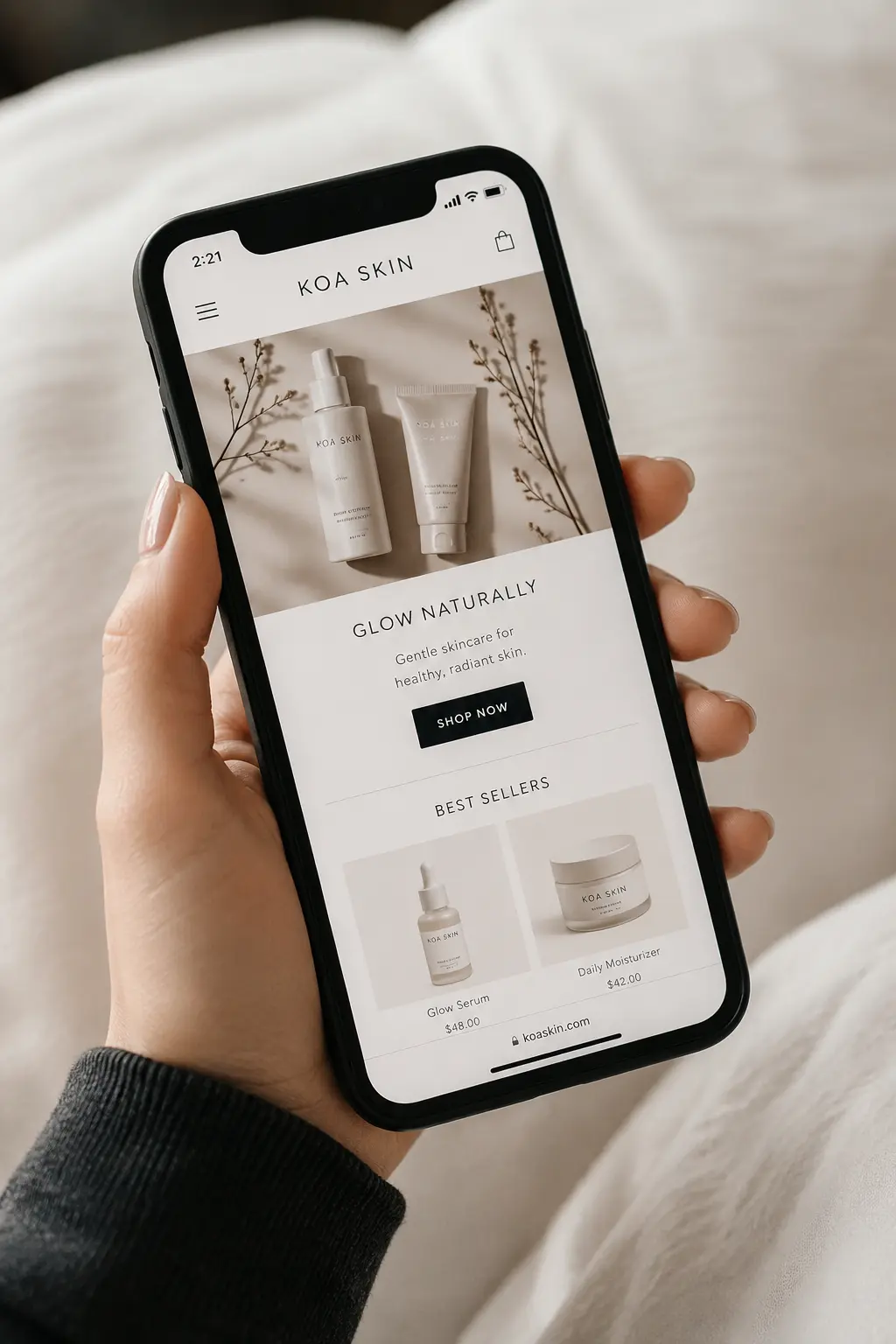
What makes a product page convert
Your product page is where the buy-or-leave decision happens. Give shoppers what they need to feel confident:
High-quality photos from every angle
Clean backgrounds so nothing competes with the product
Lifestyle images showing the product in use
Short product videos to build trust and realism
Write descriptions that sell the benefit, not the spec. "Made with hemp fabric" becomes "naturally soft, breathable fabric built for all-day comfort." Answer the questions a buyer would ask before they have to ask them.
Add the trust pages that signal you're a real business: About Us, Contact, Shipping Policy, Return and Refund Policy, and Privacy Policy. These pages quietly reassure first-time buyers that it's safe to check out.
Step 4: How Do You Build a Marketing Strategy That Pays for Itself?
The best product earns nothing if no one knows it exists. Marketing's job is to bring in traffic that converts into profitable orders. Not traffic for its own sake. This distinction matters more than most new founders realize, because it's possible to run a busy marketing operation that steadily loses money on every sale it generates.
Use organic social (Instagram, TikTok, Snapchat, Facebook, Pinterest, YouTube Shorts) to build awareness and trust. Content that teaches, shows the product in use, and shares real customer reviews does more than polished ads alone. Ask happy customers for short video reviews and reshare them. It costs nothing and converts better than most paid creative.
Layer in paid ads on Meta, Google, and email to reach targeted buyers faster. The rule that keeps paid marketing profitable: judge performance by profit, not clicks. An ad with a great click-through rate that brings in money-losing orders is still a bad ad. Founders budget $X for ads, get the volume they hoped for, and then discover the profit per order doesn't clear the spend.
Step 5: What Does Shipping and Fulfillment Actually Cost Your Business?
Shipping is where customer experience and profit overlap. On-time delivery, undamaged packaging, and clear timelines earn reviews and repeat orders. Slow, vague, or damaged fulfillment triggers refunds and bad reviews, and both eat profit in ways that don't always show up immediately in your numbers.
Get these five right:
Delivery speed
Shipping cost, and how much of it you pass on to the customer
Packaging quality
Tracking updates
A clear return process
One thing we've learned from watching founders go through launch: fulfillment costs almost always land higher than the pre-launch estimate. Dimensional weight pricing, remote area surcharges, fuel adjustments, and packaging that protects fragile items all add up fast. Build your pricing for what shipping actually costs, not what the carrier's base rate says. A satisfied customer is the cheapest growth you'll ever get.
Step 6: What Are the Real Costs of Running a Shopify Store?
Many new founders think Shopify is just a monthly subscription. Running a real store carries several recurring costs, and missing even one of them is how a "profitable" store turns out not to be.
Plan for all of these:
Shopify subscription plan
Custom domain
Premium themes or apps
Product sourcing or manufacturing
Packaging and shipping
Marketing and advertising
Transaction and payment gateway fees
Payment gateways and what they actually charge
Gateways collect payment from your customers. They split into two types: Shopify's own gateway and third-party providers. Use Shopify Payments and you avoid extra transaction fees. Use a third-party gateway and you pay an additional charge on top of your plan fees.
Shopify's third-party transaction fees by plan:
Plan | Third-party fee per sale |
Basic | 2.0% |
Grow | 1.0% |
Advanced | 0.6% |
Popular gateways include Shopify Payments, PayPal, Stripe, Razorpay (India), and PayU. Before launch, check transaction fees, payout timelines, supported countries, refund charges, and international payment support. Each of those affects your real margin in ways that don't show up in your revenue dashboard.
Step 7: Which Metrics Actually Tell You If a Shopify Store Is Profitable?
You can't grow profit you can't see. Tracking the right numbers tells you whether the business is genuinely healthy or just busy. These are the metrics every store should watch from day one:
ROAS (return on ad spend): revenue generated per dollar of ad spend
CVR (conversion rate): the percentage of visitors who buy
AOV (average order value): average spend per order
CAC (customer acquisition cost): what you pay to win one customer
Profit margin: the actual money you keep
To see true profitability, break your margin into three layers, known as contribution margin:
CM1 = Revenue minus COGS. What's left after the cost of the product itself.
CM2 = CM1 minus fulfillment (shipping, warehousing) minus transaction fees. What's left after getting the order to the customer.
CM3 = CM2 minus ad spend and marketing. The closest view of operating profit.
After the CM1/CM2/CM3 breakdown: The gap between CM1 and CM2 is where shipping and fulfillment costs live. From what we've seen, this is the layer most founders underwatch. A climbing return rate or a shipping cost creeping past 10 to 15% of revenue shows up here before it shows up anywhere else.
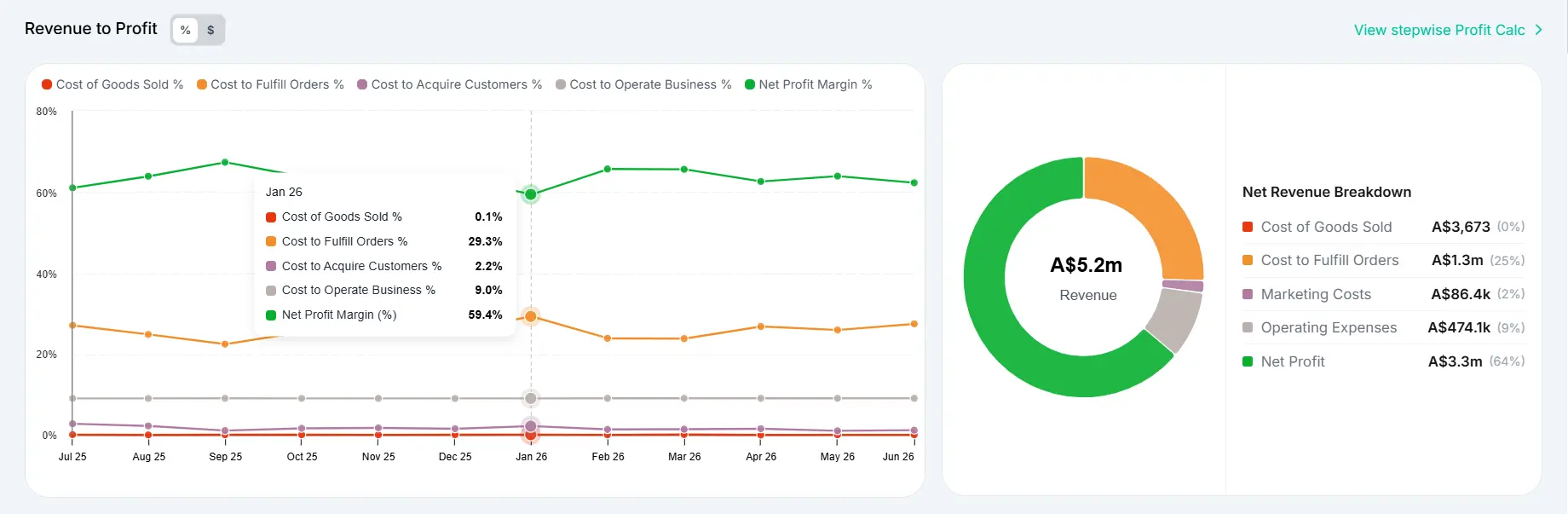
Bloom tracks all three layers automatically by pulling real cost data from your Shopify store. You see profit by product, campaign, and country without rebuilding the spreadsheet every time a cost changes.
Step 8: How Do You Scale a Shopify Store Without Scaling Your Losses?
Scaling means putting more money behind what already makes money. Before you raise any budgets, find where profit is leaking and where it's concentrated. This is the step most founders skip, because the signal they're watching (revenue, ROAS, order volume) looks good. The problem is buried in the costs their dashboard doesn't show.
Work through three questions:
Which products are genuinely profitable? Your best seller by units can be your worst earner once COGS and real ad spend are counted. We've found this is more common than founders expect. The product that drives volume often has the thinnest margin, because it's the one you're spending the most to promote. Double down on the real profit drivers, not the revenue leaders.
Which countries make money? Some international markets cost more to serve than they return. Shipping surcharges, higher return rates, and currency conversion fees compound quietly. Track profit by country and invest where the margin is.
Which campaigns bring profitable customers? Judge campaigns by the profit they generate, not the revenue they report, then scale the winners and cut the rest.
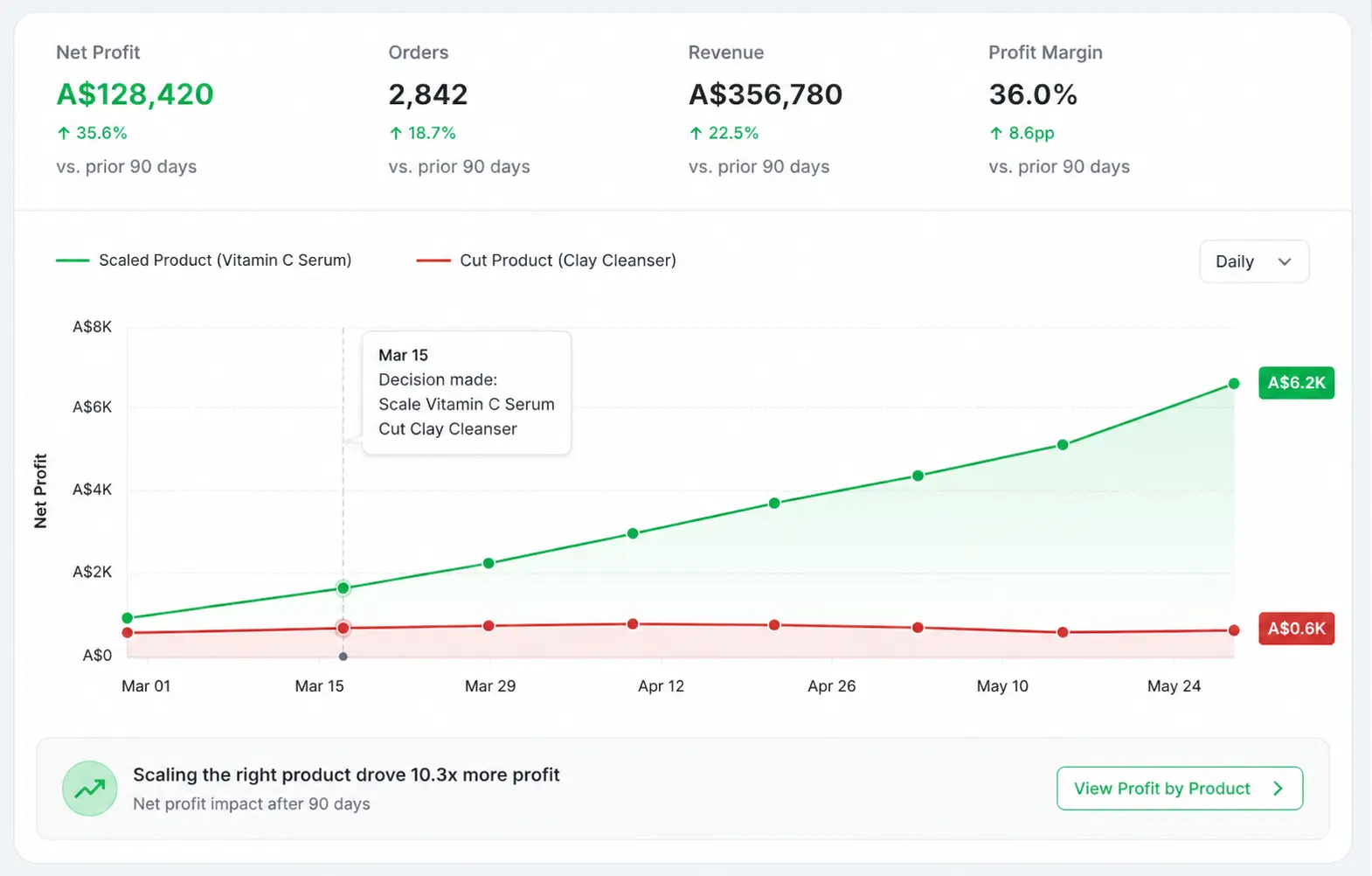
Growth from there comes from increasing budget on profitable campaigns, adding upsells and bundles, improving creative, expanding to new audiences, retargeting past visitors, and building loyalty so customers buy again. Bloom surfaces profit by product, country, and campaign automatically so the scale-or-cut call is based on what you keep, not what shows up in the ad dashboard.

Final Thoughts
Building a profitable Shopify store from scratch isn't an overnight win. It's a sequence: pick a niche with real demand and margin, source products that clear their real costs, build a store people trust, market in a way that pays for itself, plan for the hidden costs, and track the numbers that map to profit.
The founders who last are the ones who close the gap between pre-launch math and operational reality fast. Revenue feels good. Profit keeps the lights on. The two numbers diverge the moment you start spending on ads and fulfilling real orders, and the only way to catch that divergence early is to be tracking the right metrics from day one.
If you'd rather see your store's real profit by product, country, and campaign without rebuilding a spreadsheet every time your costs shift, Bloom is free to try on Shopify and install in a couple of minutes.
Frequently Asked Questions
How do you build a profitable Shopify store from scratch?
Start by choosing a niche with real demand and healthy margins, then validate product profitability before listing anything. Build a clean, mobile-friendly store with high-converting product pages and trust signals. Market through organic social and paid ads judged by profit, set up reliable fulfillment, and track ROAS, CAC, AOV, and contribution margin (CM1, CM2, CM3). Scale only what's genuinely making money.
Why does my Shopify store look profitable before launch but lose money once it's running?
Because pre-launch math almost never accounts for the full operational picture. Ad costs run higher than estimates. Fulfillment adds surcharges that don't appear in base rates. Transaction fees, returns, and packaging compound. The product that looked like a $10 margin in a spreadsheet can net $2 or less in practice once every real cost is counted. Build your pricing for what operations actually cost, not best-case projections.
What's the difference between revenue and profit in ecommerce?
Revenue is the total money customers pay you. Profit is what's left after every cost: product, shipping, packaging, fees, ad spend, refunds, and operating expenses. A store can have high revenue and negative profit if costs outrun price. Profit, not revenue, is what determines whether the business survives. Early founders should design pricing and tracking around the number they keep, not the number they collect.
Why is my Shopify store getting sales but no profit?
Usually because pricing was set against revenue instead of total cost. Once you add product cost, shipping, packaging, transaction fees, ad spend, and refunds, a product that looks profitable can lose money on every order. Calculate net profit per product, then check your contribution margin layers (CM1, CM2, CM3) to find where the money is leaking before you scale anything.
Which metrics should a new Shopify store track?
Track ROAS (ad profitability), CVR (conversion rate), AOV (average order value), CAC (customer acquisition cost), and profit margin. For a true profit view, watch contribution margin in three layers: CM1 after product cost, CM2 after fulfillment and fees, and CM3 after ad spend. These together tell you whether sales are genuinely contributing money or just generating activity.
Discover More