You open GA4 to answer a simple question: which marketing channel drove the conversion? But that may not be the question GA4 is actually answering.
Google Analytics attribution assigns credit for a conversion to the marketing touchpoints its measurement system can observe. That is not the same as identifying which channel caused someone to buy. A customer might discover your brand through a social ad, return through organic search, click an email, and purchase directly. GA4 assigns credit across those interactions according to its attribution methodology, but that credit does not tell you the full story of what influenced the purchase.
Understanding how that assignment works changes how you interpret channel performance, how you read the contribution of each touchpoint, and how you decide where to direct your marketing budget.
Key Takeaways
GA4 attribution assigns conversion credit to observable marketing touchpoints based on the attribution model and settings you choose in Google Analytics 4.
GA4 offers three attribution models: data-driven attribution (the default), paid and organic last click, and Google paid channels last click.
Data-driven attribution only activates once you have enough conversion data. Below that threshold, GA4 silently falls back to last click without telling you.
The lookback window decides which past touchpoints are eligible for credit, and the default varies by the key event you are measuring.
Attribution shows how credit is assigned, not what caused the sale or whether the attributed revenue was profitable. Combine it with revenue, acquisition, and profitability data before making budget decisions.
Why GA4 Attribution Matters for Marketing Measurement
Attribution matters because the way you assign conversion credit can change how you evaluate your marketing.
Imagine someone sees a paid social ad for a new skincare brand and clicks through to browse. A few days later, they search for the brand on Google, visit the website again, and sign up for an email. The next week, they click a product link in that email and make a purchase. If you only look at last-click attribution, email gets all the credit, while paid social and search appear to have contributed nothing. You could then underestimate the channels that helped introduce and nurture that customer in the first place.
This is where attribution can be useful. It gives you a way to look beyond the final interaction and understand the different roles touchpoints play throughout the customer journey. To interpret what GA4 is telling you, though, you first need to understand how it assigns that credit.
How GA4 Attribution Works
At a basic level, GA4 attribution follows a straightforward process.
A customer interacts with your marketing. GA4 collects the information it can observe about those interactions, such as source, medium, campaign, and channel. The customer then completes a key event, such as making a purchase or submitting a lead form. GA4 looks back at the customer's eligible interactions and assigns conversion credit according to the attribution model you are using.
That process comes down to two settings:
The attribution model decides how credit is distributed.
The lookback window decides which past interactions are eligible to receive credit.
Keeping those two concepts separate makes the rest of GA4 attribution much easier to understand.
What Attribution Models Does GA4 Use?
GA4's attribution landscape has changed since Universal Analytics. The first-click, linear, time-decay, and position-based models were retired in 2023.
Today, GA4's Attribution reports offer three Google Analytics attribution models:
Attribution model | What it tells you | Best used for |
Data-driven attribution (default) | Estimates how much each touchpoint contributed to a conversion based on your account's data | Understanding the relative contribution of touchpoints across the journey |
Paid and organic last click | Gives credit to the last paid or organic channel before conversion | Seeing which channel was closest to the conversion |
Google paid channels last click | Gives credit to the last Google paid channel before conversion | Evaluating the performance of Google paid channels |
The biggest difference is that data-driven attribution is the only one of the three that uses machine learning to estimate the contribution of touchpoints. The other two use fixed rules to determine which interaction receives credit.
So what does that look like in practice?
How GA4 Attribution Models Assign Credit
1. Data-Driven Attribution
Data-driven attribution in Google Analytics, or DDA, is designed to move beyond simply giving all the credit to the last interaction.
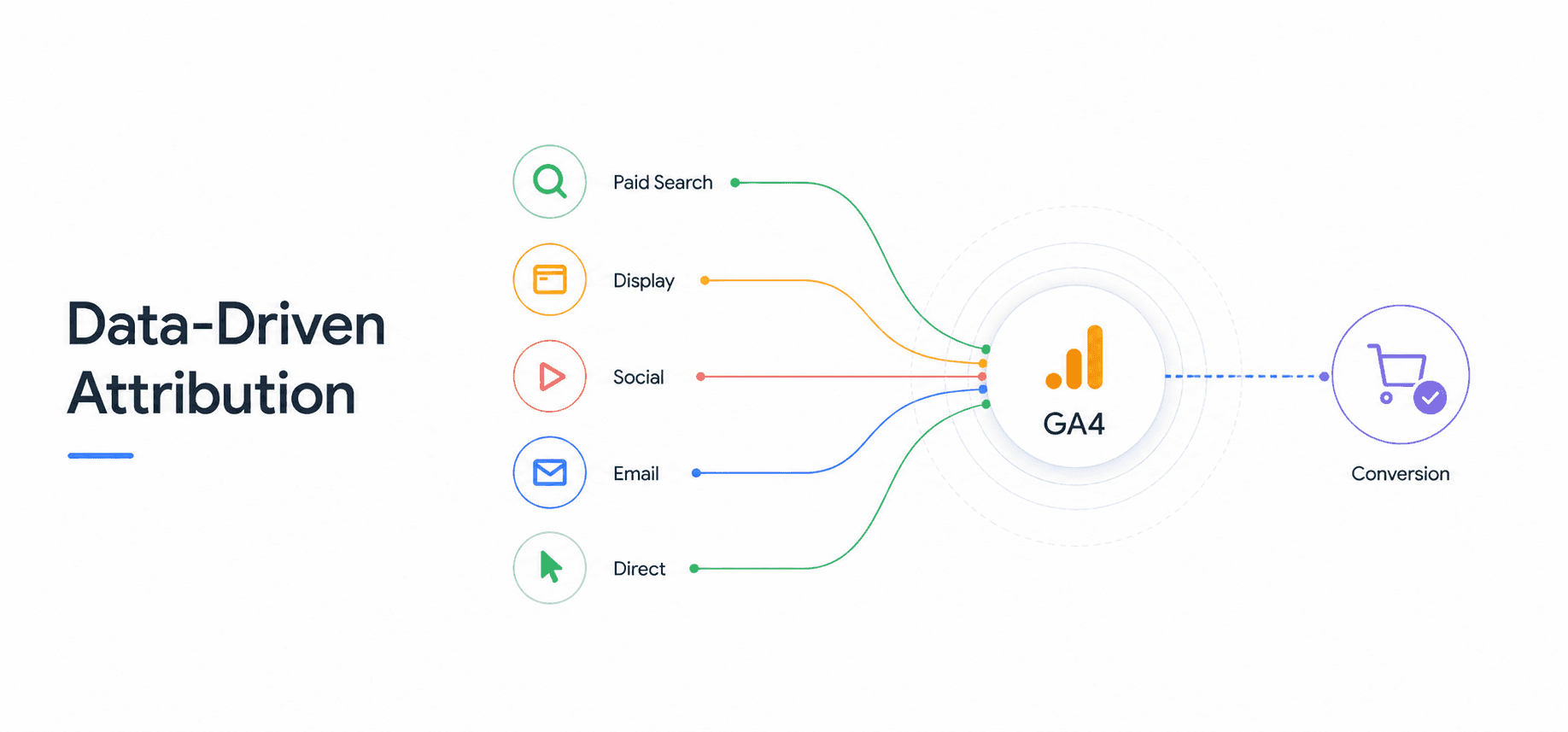
GA4 analyzes converting and non-converting paths to estimate how different interactions contributed to the likelihood of a key event. In simple terms, it asks what changes when a particular interaction is present or absent from the journey.
For example, imagine this customer journey:
Paid Search → Social → Affiliate → Search → Purchase
Under a last-click model, Search gets all the credit. Under DDA, GA4 looks at the journey and the available data to estimate the contribution of the different interactions. It may determine that the final Search interaction contributed significantly, while the earlier Paid Search or Social interactions also played a role. The result is a more nuanced view than simply saying the last channel gets the sale.
There is an important catch. Data-driven attribution needs a minimum volume of data before GA4 will run it. It requires at least 400 conversions for the specific key event and 20,000 total conversions across all key events within the lookback window. If your property does not meet that threshold, GA4 quietly falls back to last-click attribution, and it does not notify you when it does. That means many stores believe they are running on DDA when they are actually seeing last-click results.
You can check whether DDA is genuinely active by comparing models in GA4's Model Comparison report. If data-driven and last click show identical numbers for a key event, DDA is not running for it.
2. Paid and Organic Last Click
This model is much simpler.
It gives 100% of the credit to the last paid or organic channel the customer interacted with before converting. Direct visits are ignored unless the entire journey consists of direct visits.
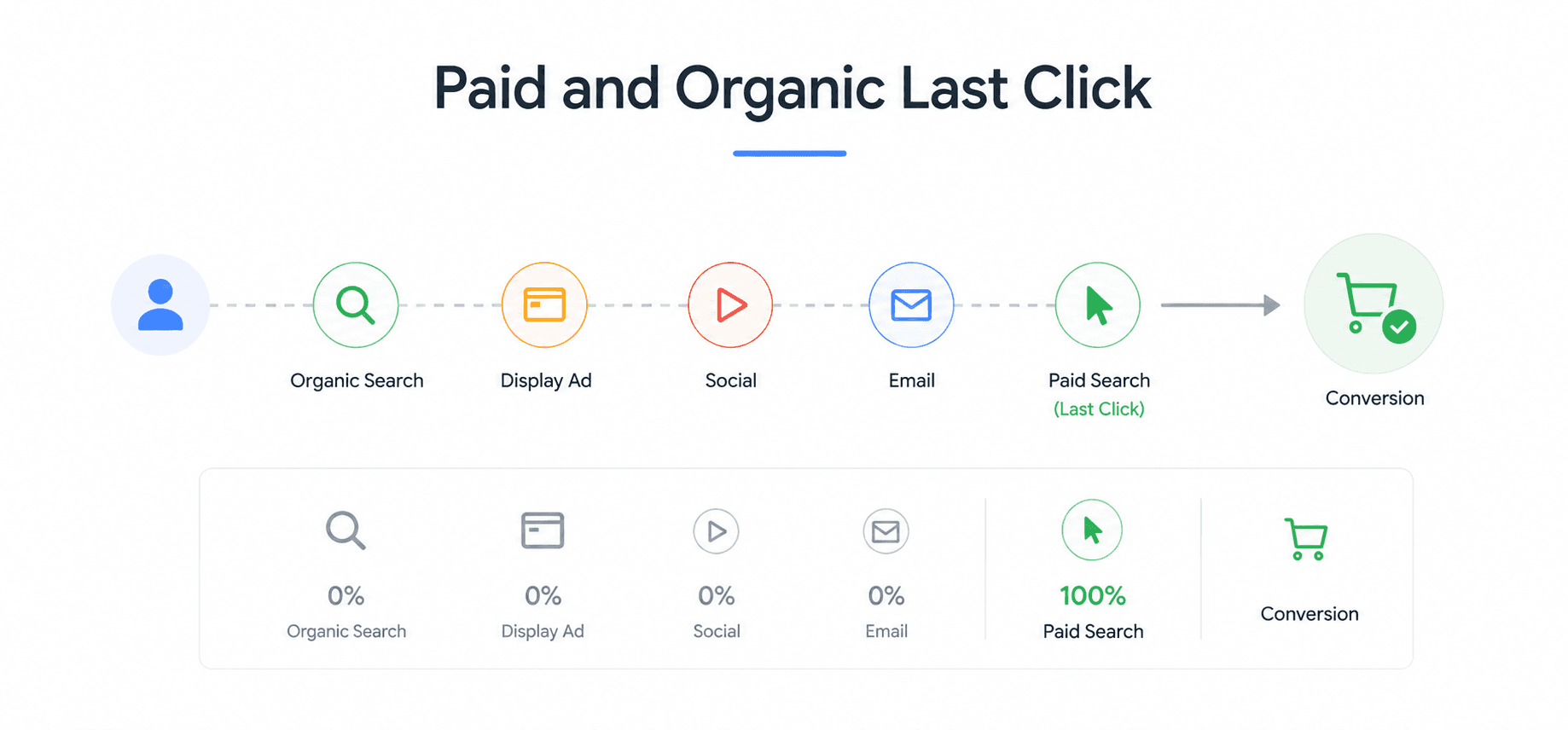
For example:
Display → Social → Paid Search → Organic Search → Purchase
Organic Search gets all the credit because it was the last non-direct interaction.
If the journey is:
Display → Social → Paid Search → Direct → Purchase
Paid Search gets the credit because the direct visit is ignored.
This model is useful when you want a straightforward view of the channel closest to conversion, but it naturally tells you less about the earlier stages of the journey.
3. Google Paid Channels Last Click
This model narrows the question further.
It gives 100% of the credit to the last Google paid channel the customer interacted with before converting.
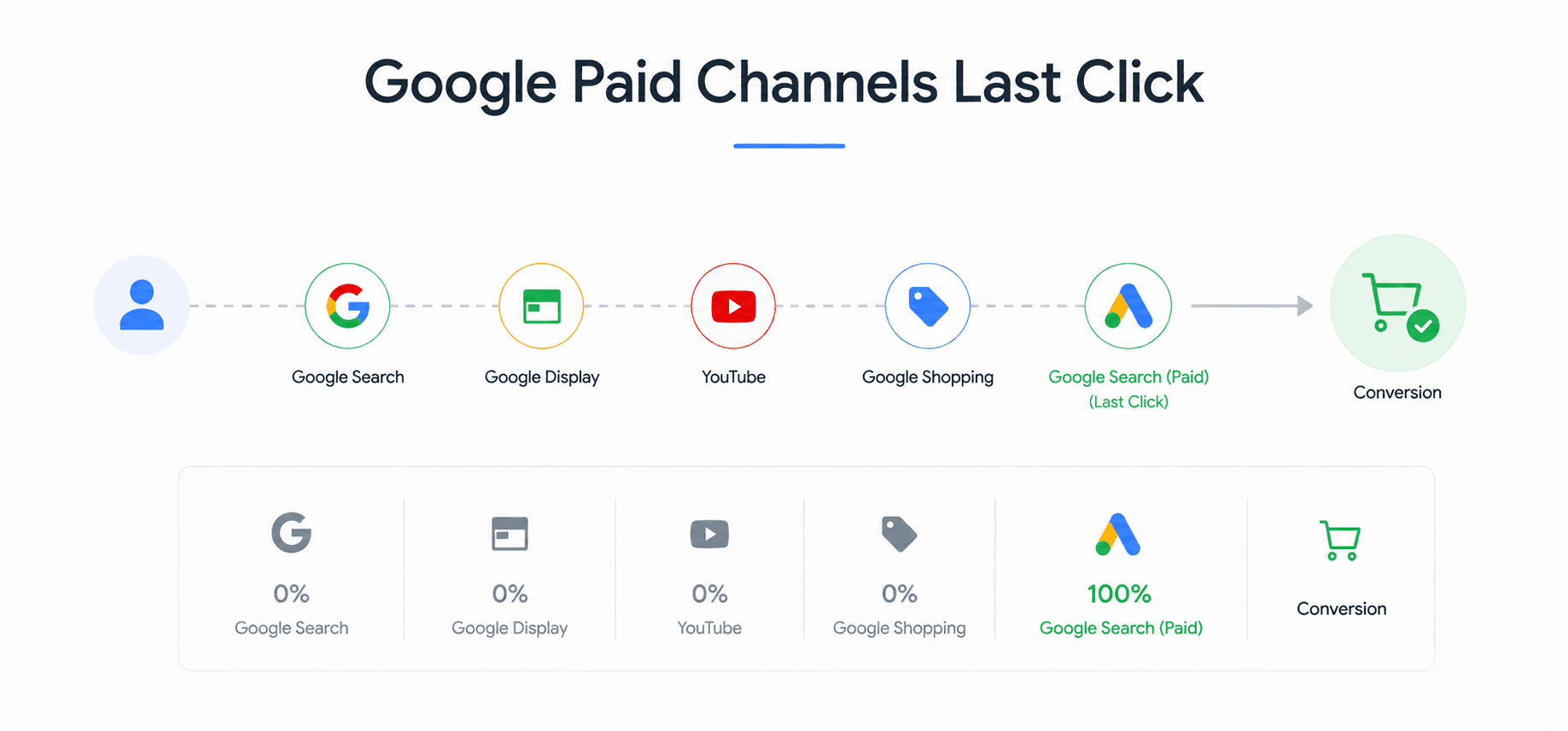
For example:
Display → Social → Paid Search → Organic Search → Purchase
Paid Search receives the credit because it is the last Google paid interaction.
If there is no Google Ads interaction, the model falls back to paid and organic last click. So if the journey is:
Display → Social → Email → Direct → Purchase
Email receives the credit, because there is no Google paid interaction and the direct visit is ignored.
Which GA4 Attribution Model Should You Use?
Data-driven attribution is the default attribution model Google Analytics uses, but you can switch to either of the two last-click models.
For most marketers, DDA is the most useful starting point because it provides a broader view of how touchpoints contribute across the journey. The last-click models are still useful as comparison points, especially when you want a simpler view of the interaction closest to conversion.
Before you rely on DDA, confirm it is actually running. If your conversion volume sits below the 400-per-event threshold, you may be seeing last-click results under a data-driven label, in which case a deliberate last-click model gives you a clearer and more stable picture until your volume grows.
The important thing is not to treat one model as the universal answer. If DDA shows that paid social contributes throughout the journey while last click shows that paid search closes more conversions, that difference is useful information. It tells you the two channels may be playing different roles.
How Does the Lookback Window Affect Attribution Credit?
The lookback window in Google Analytics, sometimes called the attribution window, determines how far back GA4 looks for interactions that are eligible for attribution credit.
Imagine a customer clicks a paid ad on January 1, returns through organic search on January 20, and purchases on January 25. If the relevant lookback window is 30 days, both interactions can be considered for attribution. If the paid ad click happened on December 1 instead, it would fall outside that window and would not be eligible.
This matters because customers do not all buy on the same timeline. Someone buying a low-cost product may discover your brand and convert within a day. Someone researching an expensive product may take weeks before deciding. A shorter window can miss earlier interactions, while a longer window can include more of the journey. Neither is inherently better. The right choice depends on how long your customers typically take to convert.
The key event you are measuring also affects attribution, because different key events use different default lookback windows and therefore consider different timeframes. Acquisition key events such as first_open and first_visit use a 30-day default. Other key events use a 90-day default, with the option to change that to 30 or 60 days. Engaged-view key events use a separate 3-day default.
In essence, the lookback window shapes how much of the customer journey GA4 considers when assigning credit. Since the timeframe also varies by key event, understanding both helps you interpret attribution results with more context.
Why GA4 Reports Can Show Different Attribution
GA4 attribution reports can show different attribution information depending on the report or dimension you are looking at. This is because GA4 uses three different traffic-source scopes to answer different questions about the customer journey.
Think of these scopes as different lenses:
First-user dimensions show how a user was originally acquired. They help you understand where new users first came from.
Session dimensions show what brought a user to a specific visit. They help you understand the source of traffic for that session.
Event-scoped dimensions are used when analyzing key events such as purchases. The reporting attribution model you select in GA4 determines how conversion credit is assigned to the traffic sources associated with those events.
For example, imagine a customer first finds your store through organic search, returns a week later through a paid ad, and later completes a purchase after another marketing interaction. The user acquisition data may still reflect the original source, while the session data reflects how the user arrived during a particular visit. The purchase, meanwhile, is attributed according to the reporting attribution model selected in GA4.
This is why two GA4 reports can seem to tell different stories about the same customer or conversion. They may be measuring different things and using different scopes, so they are not necessarily contradicting each other.
For marketers, the key is to understand what each report is measuring before comparing channel performance. A report about how users were first acquired is not directly comparable with a report that assigns conversion credit to a purchase.
What Google Analytics Attribution Cannot Tell You
Attribution can help you understand how marketing performs, but there are important gaps in what the data can show.
It cannot capture every influence on a purchase. Word of mouth, offline conversations, private messages, podcast mentions, and other untracked interactions may never appear in GA4.
It cannot always show directly observed user activity. Privacy restrictions and incomplete cross-device tracking can create data gaps, which GA4 may fill with modeled data and estimates.
It cannot explain why a customer converted. Even when GA4 captures a touchpoint, it cannot tell you whether the ad creative, the messaging, or the website experience influenced the decision.
It cannot prove that a channel caused the conversion. Receiving attribution credit only shows that a channel was part of the measured journey. It does not prove the customer would not have converted without it. Measuring causal impact requires methods such as incrementality testing or controlled experiments.
It cannot tell you whether attributed revenue is profitable. A channel may receive strong attribution credit but deliver less profit after COGS, fulfillment, shipping, and other costs. A tool like Bloom can help unlock that profitability piece by connecting marketing performance with actual sales profitability, so you can see whether your ad spend is driving not just more revenue, but more profit.
How to Use GA4 Attribution Data to Make Better Decisions
GA4 attribution is most useful when you treat it as a tool for understanding your marketing performance, not as a perfect record of what caused every sale.
Look beyond the channel that receives the final credit. Use data-driven attribution to understand which touchpoints appear to contribute throughout the customer journey, and use last-click models as a simpler view of the interactions closest to conversion. If the models tell different stories, that difference is itself useful. It may reveal that one channel mainly helps customers discover your brand, while another more often closes the sale.
Check that your chosen model is actually running, and consider whether your lookback window reflects how long your customers typically take to buy. The right settings depend on your business and buying cycle, not on the assumption that one configuration works for everyone.
Finally, do not use GA4 marketing attribution data in isolation. Bring it together with revenue, customer acquisition, and profitability data to understand not just which channels receive the most conversion credit, but where your next dollar has the best chance of generating profitable growth.
Frequently Asked Questions
What is GA4 attribution?
GA4 attribution is the process of assigning credit for a conversion to the marketing touchpoints GA4 can observe. It helps marketers understand how different interactions contributed to a conversion, but it does not prove which channel caused the customer to buy.
What is the default attribution model in GA4?
Data-driven attribution is the default reporting attribution model in GA4. It uses machine learning to estimate the contribution of different touchpoints based on your available account data.
What attribution models does GA4 have?
GA4's Attribution reports currently offer three models: data-driven attribution, paid and organic last click, and Google paid channels last click. The first-click, linear, time-decay, and position-based models were retired in 2023.
Why does GA4 data-driven attribution sometimes match last-click?
Data-driven attribution needs at least 400 conversions for a key event and 20,000 total conversions within the lookback window before GA4 will run it. Below that threshold, GA4 silently falls back to last-click attribution without notifying you, so the two models show identical numbers. You can confirm this in the Model Comparison report.
What is the difference between an attribution model and a lookback window?
The attribution model determines how conversion credit is distributed among eligible touchpoints. The lookback window determines which past touchpoints are eligible to receive that credit.
Does GA4 attribution tell me which marketing channel caused the sale?
No. Attribution shows how credit is assigned within GA4's measurement system. It does not prove that a specific channel caused the conversion. To measure causal or incremental impact, marketers need methods such as controlled experiments or incrementality testing.
How should marketers use GA4 attribution data?
Use GA4 attribution to understand customer journeys, compare the contribution of different touchpoints, and identify how channels work together. Combine attribution data with revenue, acquisition costs, and profitability metrics before making budget decisions.
Can GA4 attribution tell me which channel is most profitable?
Not by itself. GA4 attribution focuses on conversion credit and marketing interactions. To understand profitability, you also need to account for the costs of generating and fulfilling those sales. Tools such as Bloom connect marketing performance with profitability to help you evaluate the financial impact of your acquisition efforts.
Discover More