How to Calculate Amazon Profit: A Beginner's Guide


To calculate your Amazon profit, subtract costs from revenue in layers, not all at once. Start with gross revenue, remove refunds and discounts to reach net revenue, then subtract costs one stage at a time: product costs (COGS) give you Gross Profit (CM1), fulfillment gives you CM2, advertising gives you CM3, and operating expenses give you your true net profit. Working through these layers shows not just how much you keep, but exactly where your margin leaks.
Revenue is only the starting point. A store can post strong sales and still lose money, because revenue ignores product costs, Amazon fees, fulfillment, advertising, returns, and operating expenses. This guide walks through each layer with one running example, then covers the most common profit leaks and what a healthy margin looks like.
Key Takeaways
Amazon profit is calculated in layers: Net Revenue, then CM1, CM2, CM3, and finally Net Profit.
Gross Profit (CM1) is Net Revenue minus COGS. In our example, that is $52,000 on $92,000 of net revenue, a 56.52% margin.
CM2 subtracts fulfillment, CM3 subtracts advertising. Each layer isolates a different profit leak.
True net profit subtracts operating expenses. In our example that is $17,000, an 18.48% net margin.
The biggest leaks are missing operating expenses, overlooked Amazon fees, unaccounted FBM fulfillment costs, and hidden discounts.
The Gap Between Revenue and Real Profit
Between revenue and net profit sit product costs, Amazon fees, fulfillment, advertising, refunds, and operating expenses. Calculating profitability step by step ensures no major cost is overlooked. Miss even one expense and a product or store can look far more profitable than it really is.
A product may sell well and still carry poor margins because advertising is too high, fulfillment is expensive, or Amazon fees eat into the contribution. Breaking the calculation into stages tells you which cost is doing the damage.
Step 1: Calculate Gross Revenue
Gross revenue is the total your business generated before any costs or expenses. It does not deduct marketing, fulfillment, or any other cost.
Formula: Gross Revenue = Units Sold × Price per Unit
Example: 5,000 units × $20 per unit = $100,000 gross revenue
Step 2: Calculate Net Revenue
Net revenue is what remains after customer returns, refunds, and discounts. When calculating it, account for every return and refund component that applies, including refunded product sales, refunded shipping, refunded fees and taxes, retro charges, and any refunded expenses.
Formula: Net Revenue = Gross Revenue − Refunds − Discounts + Separately Charged Shipping Revenue
Example: $100,000 gross − $5,000 refunds − $3,000 discounts = $92,000 net revenue
Once net revenue is set, account for any applicable taxes and duties separately to see the full financial impact. Net revenue is the base for every margin percentage that follows.
Step 3: Calculate Gross Profit (CM1)
Gross Profit, also called Contribution Margin 1 (CM1), is what remains after subtracting the Cost of Goods Sold (COGS) from net revenue. COGS covers the direct costs of producing or buying what you sold: raw materials, manufacturing, direct labor, and other directly attributable product costs.
Formula: Gross Profit (CM1) = Net Revenue − COGS
Margin: CM1 % = CM1 ÷ Net Revenue × 100
Example: $92,000 net − $40,000 COGS = $52,000 CM1, or 56.52% of net revenue
This percentage shows how much of net revenue survives the direct cost of the products themselves.
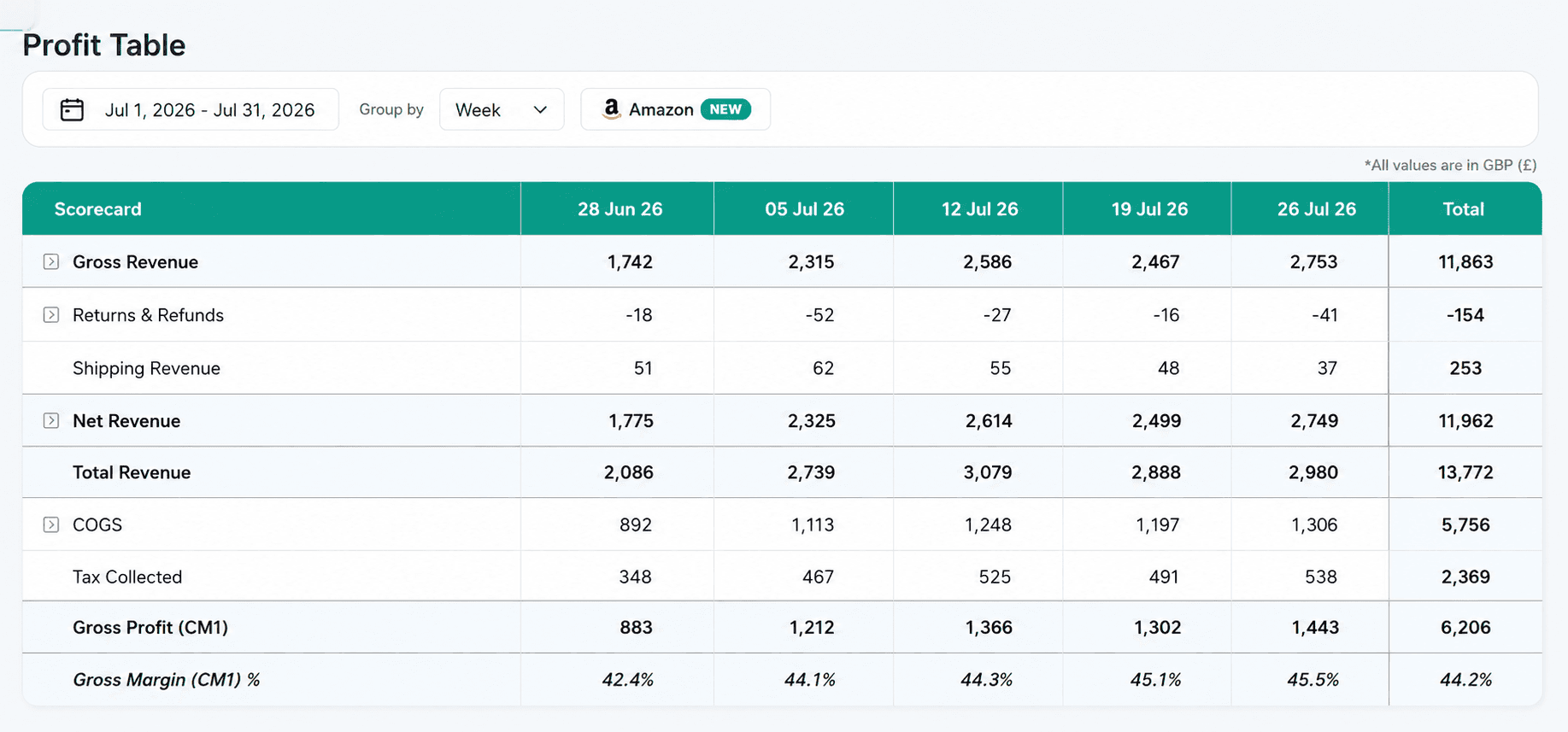
Step 4: Calculate Profit After Fulfillment (CM2)
Contribution Margin 2 (CM2) is the profit left after subtracting order fulfillment costs from CM1. For Amazon sellers these can include FBA fulfillment fees per unit, shipping chargebacks and holdback fees, shipping service and gift wrap chargebacks, return postage and fuel surcharges, and non-apparel rollup fees. If you fulfill yourself (FBM), include your own shipping, packaging, and labor.
Formula: CM2 = CM1 − Fulfillment Costs
Margin: CM2 % = CM2 ÷ Net Revenue × 100
Example: $52,000 CM1 − $12,000 fulfillment = $40,000 CM2, or 43.48% of net revenue
Step 5: Calculate Profit After Marketing Spend (CM3)
Contribution Margin 3 (CM3) is the profit left after subtracting advertising and marketing from CM2. This matters because strong ad performance does not mean a profitable business. CM3 tells you whether your marketing investment is actually adding to profit. Marketing spend usually includes Sponsored Products, Sponsored Brands, Sponsored Display, and other promotional costs.
Formula: CM3 = CM2 − Marketing Spend
Margin: CM3 % = CM3 ÷ Net Revenue × 100
Example: $40,000 CM2 − $15,000 marketing = $25,000 CM3, or 27.17% of net revenue
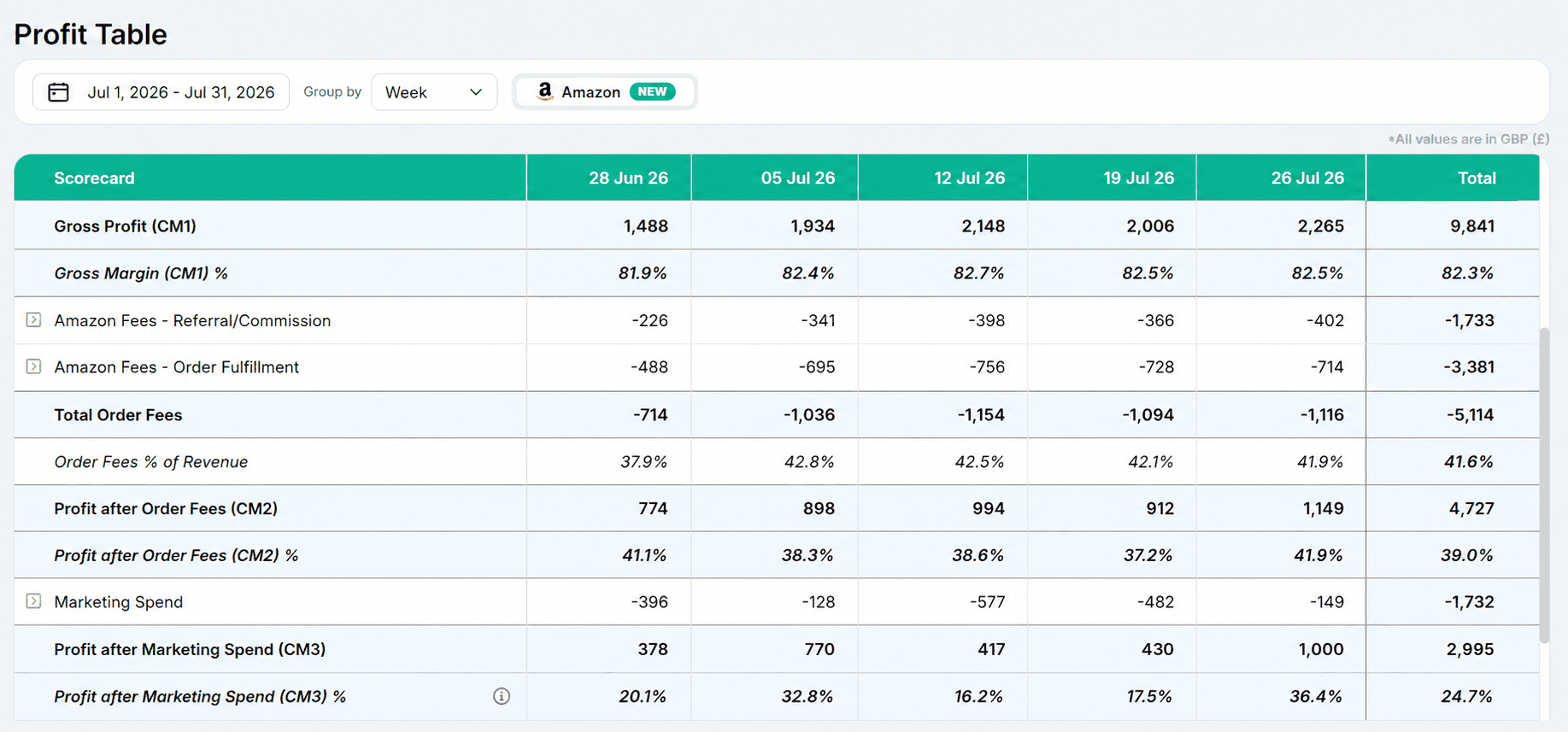
Step 6: Calculate True Net Profit
Net profit is what remains after subtracting all applicable operating expenses from CM3. This is the clearest single measure of your Amazon profitability. Operating expenses can include Amazon subscription fees, inbound shipping and transportation, inbound convenience charges, upstream processing and storage fees, AWD and long-term storage fees, storage billing fees, FBA removal and disposal fees, reimbursements, and other platform fees. Include only what applies to your business.
Formula: Net Profit = CM3 − Operating Expenses
Margin: Net Profit Margin = Net Profit ÷ Net Revenue × 100
Example: $25,000 CM3 − $8,000 operating expenses = $17,000 net profit, an 18.48% net margin
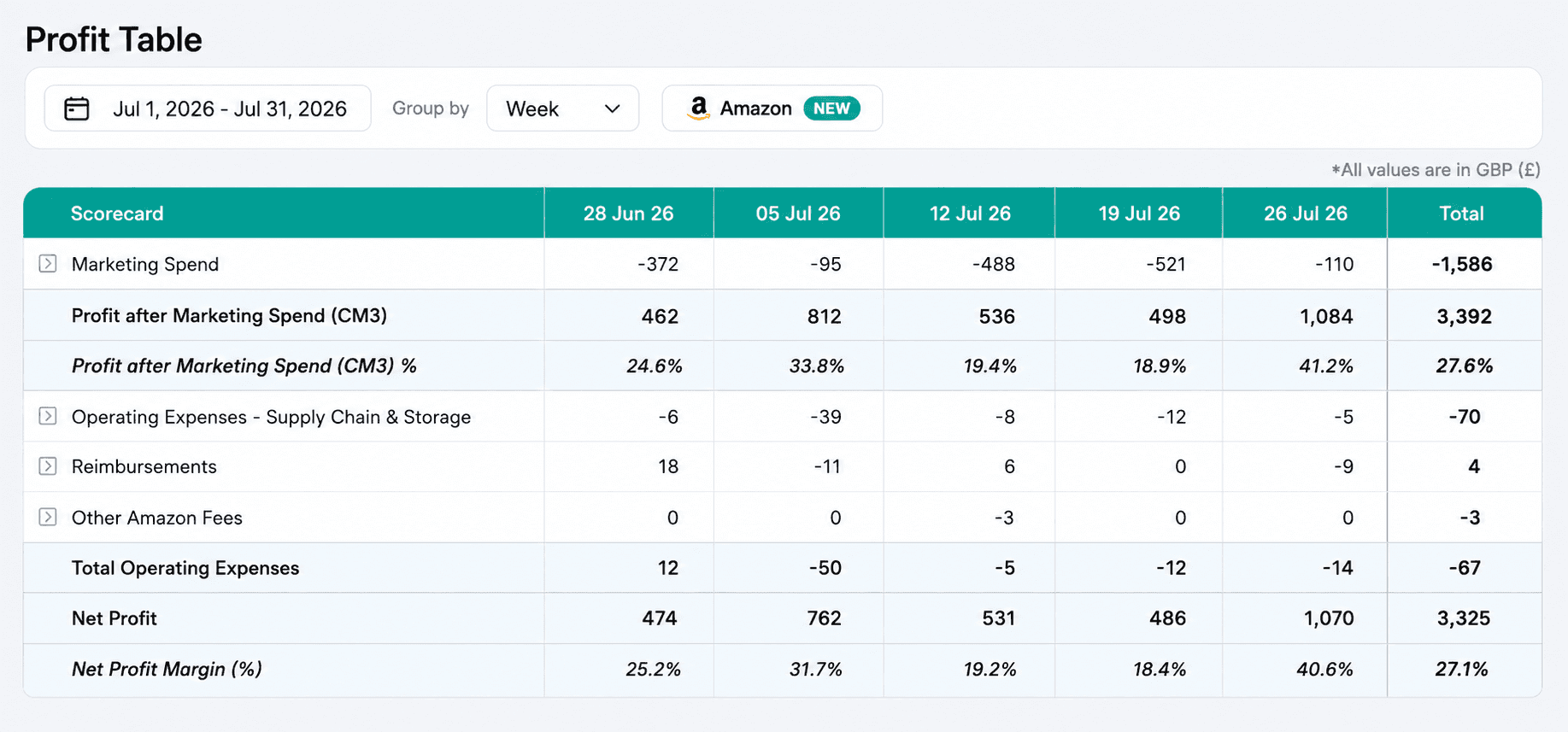
This gives a far clearer picture of profitability than revenue, gross margin, or ROAS alone. Comparing your gross margin with your net margin shows where profit is being lost, so you can fix the leaks and scale more efficiently.
Amazon Profit Calculation Example
Here is the full running example in one view, from gross revenue down to true net profit.
Line item | Amount | % of Net Revenue |
Gross Revenue | $100,000 |
|
Less: Refunds and Returns | ($5,000) |
|
Less: Discounts | ($3,000) |
|
Net Revenue | $92,000 | 100% |
Less: COGS | ($40,000) |
|
Gross Profit (CM1) | $52,000 | 56.52% |
Less: Fulfillment | ($12,000) |
|
Profit After Fulfillment (CM2) | $40,000 | 43.48% |
Less: Marketing Spend | ($15,000) |
|
Profit After Marketing (CM3) | $25,000 | 27.17% |
Less: Operating Expenses | ($8,000) |
|
Net Profit | $17,000 | 18.48% |
Major Profit Leaks to Watch For
Small omissions create a large gap between reported profit and true net profit. Account for every applicable cost and fee:
Missing operating expenses: Leaving out platform, storage, or transportation costs overstates net profit.
Ignored FBM fulfillment costs: If you fulfill yourself, include shipping, packaging, labor, and related expenses.
Overlooked discounts: Count all customer discounts and revenue reductions, not just promotional rebates.
Hidden Amazon fees: Watch for debt payment fees, Premium Services (SAS) fees, taxes on Amazon fees, and other platform charges.
What a Healthy Amazon Profit Margin Looks Like
There is no single healthy margin for every seller. The right target depends on your category, pricing, COGS, fulfillment model, ad strategy, operating expenses, and growth stage. Treat the ranges below as general guidelines, not fixed standards.
Metric | Vulnerable / Thin | Workable / Healthy | Strong / Excellent |
Gross Profit (CM1) | Below 40% | 40% to 60% | 60% and above |
Profit After Fulfillment (CM2) | Below 30% | 30% to 50% | 50% and above |
Net Profit Margin | Below 10% | 10% to 20% | 20% and above |
A low CM1 points to high product costs relative to price, leaving little room for ads, fulfillment, and overhead. A thin CM2 makes scaling paid acquisition hard. A net margin under 10% means a small rise in COGS, ad spend, or tariffs can wipe out your profit.
Calculating Amazon Profit Without the Spreadsheet Work
You can track all of this in a spreadsheet, but manual entry invites missing costs, data-entry errors, and calculation drift. Profit analytics tools automate the layered calculation. Bloom goes beyond basic profit tracking: it cleans and organizes your Amazon data, then turns it into a detailed view of profitability by product, so you can see where money is made and where it leaks.

Final Thoughts
Calculating Amazon profit step by step shows where your business performs well and where it loses money. Breaking profitability into CM1, CM2, CM3, and net profit pinpoints the exact cost affecting your margin so you can act on it. With a clear view of where money is made and where it leaks, you can improve margins and scale with more confidence.
Frequently Asked Questions
What is the formula to calculate Amazon profit?
Net Profit = Net Revenue − COGS − Fulfillment − Marketing − Operating Expenses. It is easiest to work in layers: Net Revenue, then CM1 (after product costs), CM2 (after fulfillment), CM3 (after marketing), and finally net profit.
What is a good profit margin for Amazon sellers?
There is no universal number. A net margin of 10% to 20% is generally solid, 20% and above is excellent, and below 10% is vulnerable to cost increases. The right target depends on your category and fulfillment model.
What is the difference between gross profit and net profit on Amazon?
Gross profit (CM1) is net revenue minus COGS only. Net profit also subtracts fulfillment, advertising, and operating expenses, so it reflects what you actually keep.
What do CM1, CM2, and CM3 mean?
They are contribution margin layers. CM1 is profit after product costs, CM2 is profit after fulfillment, and CM3 is profit after marketing. Each isolates a different cost so you can see where margin is lost.
How do returns and refunds affect Amazon profit?
They reduce net revenue at the top of the calculation and can add return postage costs at the fulfillment layer, so they hit profit in two places.
Can I calculate Amazon profit in a spreadsheet?
Yes, but it is manual and error prone. Missing costs and formula mistakes are common. Profit analytics tools automate the layered calculation and reduce the risk of overstating profit.
Discover More