Shopify Tax Collection and Tax Claimed Back in Bloom
Shopify tax collection shows the tax you collect from customers, not the tax you claim back. See how Bloom adds tax claims back to your profit calculation.

Shopify tax collection covers the tax you collect from customers at the time of sale, but it only tells half of the tax story. Many sellers also pay tax when buying products from vendors and can claim that tax back from the government. Bloom lets you add Tax Claimed Back to your setup so your profit calculation reflects your actual net tax position, not just the tax collected.
Key Takeaways
Sellers collect tax from customers at the time of sale and are required to pay it to the government.
Sellers may also pay tax when purchasing products from vendors, and eligible tax such as UK VAT on purchases can be claimed back.
Net Tax Paid = Tax Collected minus Tax Claimed Back.
Shopify tracks the tax collected from customers, but tax paid to vendors and claimed back is generally not part of Shopify's profit calculation.
Bloom lets you add Tax Claimed Back through Operating Expense setup, as a fixed amount or a percentage of COGS or sales, and includes it in profit automatically.
How Shopify Tax Collection and Tax Paid to Vendors Work
Tax moves in two directions for most merchants: in from customers, and out to vendors.
Tax collected from customers
When a customer buys from your store, you collect tax on the sale. That tax is not yours to keep. You are required to pay it to the government.
Tax paid to vendors
When you buy products from your vendors, you may pay tax on those purchases too. Depending on the tax system, some of that tax can be claimed back from the government.
A UK VAT example
UK VAT is a clear example of how this works:
You pay VAT when purchasing goods from your vendors.
You collect VAT from customers when you sell those goods.
The VAT you paid to vendors can be claimed back from the government.
The net tax paid formula
Because eligible tax on purchases can be claimed back, you do not necessarily pay the full amount of tax you collected from customers. The calculation is:
Tax Collected minus Tax Claimed Back = Net Tax Paid
Why Tax Claimed Back is Missing from Shopify Profit
Shopify already tracks the tax you collect from customers. The tax you pay to vendors and then claim back is a different matter: it is generally not part of the profit calculation in Shopify.
That leaves a gap. If your profit view only reflects tax collected, it may not show your actual net tax position, and you may not have a complete picture of how taxes affect your real profit.
The gap matters most for sellers with significant purchasing costs and tax obligations, because the amount of tax claimed back is larger for them.
How Bloom Tracks Tax Claimed Back in Your Profit Calculation
Bloom lets you account for the tax you claim back from the government, so it becomes part of your profit calculation instead of a number you adjust for separately.
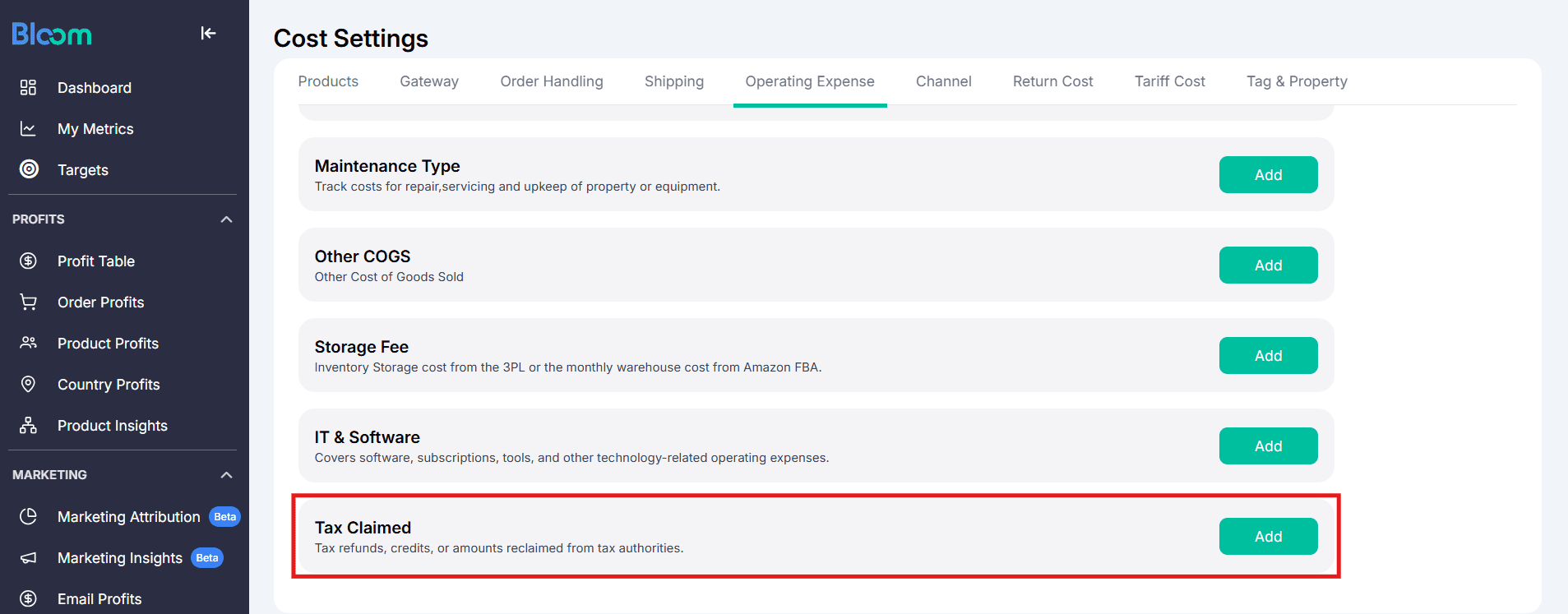
Add Tax Claimed Back in Operating Expense setup
You add Tax Claimed Back through Bloom's Operating Expense setup, alongside your other business costs.
Set it as a fixed amount or a percentage
You can set Tax Claimed Back in the way that matches how you track your tax claims:
Fixed amount
Percentage of COGS, for example 10% of COGS
Percentage of sales, for example 2% of sales
Let Bloom apply it automatically
Once it is set up, Bloom automatically calculates the claimed-back tax based on the percentage you selected and applies it to your profit calculation. You do not need to calculate and adjust your profit manually every time.
Example: Tax Collected vs Tax Claimed Back
This is an illustrative example.
A merchant collects $10,000 in tax from customers. They also have $4,000 in eligible tax paid to vendors that can be claimed back.
Net tax payable to the government = $10,000 minus $4,000 = $6,000.
What the merchant sees | |
Shopify | $10,000 in tax collected from customers |
$10,000 in tax collected, plus $4,000 in tax claimed back included in the profit calculation | |
Net tax paid | $6,000 |
Looking only at the $10,000 collected leaves out the $4,000 the merchant gets back. With Tax Claimed Back included, the merchant gets a more complete picture of their actual profitability.
What Bloom does Differently with Tax Claimed Back
Tracks tax claimed back in addition to the tax information already available from your store.
Lets you enter claimed-back tax through Operating Expense setup.
Includes the claimed-back amount in your profit calculations.
Gives you a clearer view of your net tax impact, rather than only the tax collected from customers.
Helps you get a more complete and accurate view of your actual profit.
Why Your Net Tax Position Matters for Profit Decisions
Shopify tax collection data shows what you collected from customers, but tax collected alone does not always give you the complete picture. The tax you claim back is an important part of understanding your actual tax position.
By adding Tax Claimed Back to Bloom and including it in your profit calculation, you can make profit decisions using a more complete picture of your business costs and tax obligations.
Frequently Asked Questions
Does Shopify track tax collected from customers?
Yes. Shopify already tracks the tax you collect from customers at the time of sale.
Does Shopify include tax claimed back in profit?
Tax paid to vendors and then claimed back from the government is generally not part of the profit calculation in Shopify. This means your Shopify profit view may not reflect your actual net tax position.
How do you calculate net tax paid?
Net Tax Paid = Tax Collected minus Tax Claimed Back. For example, if you collect $10,000 in tax from customers and can claim back $4,000 in eligible tax paid to vendors, your net tax payable is $6,000.
How do I add tax claimed back in Bloom?
You add Tax Claimed Back through Bloom's Operating Expense setup. You can set it as a fixed amount or as a percentage of COGS or sales, and Bloom includes it in your profit calculation automatically.
Can I set tax claimed back as a percentage of COGS or sales?
Yes. You could set Tax Claimed Back as 10% of COGS, or as 2% of sales, depending on how you track your tax claims. Bloom then calculates the claimed-back amount automatically and applies it to your profit calculation.
Which merchants benefit most from tracking tax claimed back?
Tracking tax claimed back can be particularly important for merchants with significant purchasing costs and tax obligations, where the claimed-back amount has a bigger effect on profit.
Set up Tax Claimed Back in Bloom's Operating Expense setup to see profit that reflects your net tax position.
Know Your Real Profit And
The Ads That Actually Sell.
No need to spend. Just try it on your store.