Calculating Product Profit Margin in Shopify Stores


Your best-selling product is not always your best-earning product. A SKU can fly off the shelf, top your sales report, and still hand you almost nothing once you take out what it actually costs to make and sell.
Sales volume hides this. Revenue hides it too. The only way to see it is to break profit down to the product level, one SKU at a time, and ask a plain question: after the real costs, how much does this product keep?
This guide shows you how to do that for your Shopify store. You will get the formulas, a worked example, a calculator you can run with your own numbers, and a clear sense of where product-level profit is useful and where it stops being reliable.
TL;DR
Product profit margin tells you what a single SKU keeps after its direct costs, not what your whole store keeps.
Gross profit = net revenue minus COGS. Net revenue is your sales after discounts and refunds, with taxes and duties left out because you only collect and pass them on.
Shipping needs a rule, not a blind split. Shopify records it per order, so dividing it evenly across products distorts the math. Allocate it by weight, price, or a set per-product cost and it belongs in product profit.
For a closer-to-net view, subtract allocated shipping and the ad spend you can tie to the product. Shared costs like rent, software, and salaries belong at the store level.
What Is Product Profit Margin?
Product profit margin is the percentage of a single product's net revenue that you keep as profit after its direct costs. At the gross level, that means revenue minus the cost of goods sold (COGS). It measures one SKU's performance, which is different from your store's overall profitability, where costs are shared across everything you sell.
That distinction matters more than it sounds.
When you measure profit for the whole business, you fold in every cost: rent, payroll, software, the lot. When you measure profit for one product, you only count the costs you can fairly tie to that product. Try to push shared overhead onto a single SKU and the number stops meaning anything.
So product-level analysis deliberately stays narrow. It looks at the costs that belong to the product itself: what you paid for it, the discounts you gave on it, and the refunds it generated. Get those right and you can rank your catalog by what each item truly contributes, not by how loudly it sells.
How Do You Calculate Gross Profit Margin For A Shopify Product?
To calculate a product's gross profit, subtract its cost of goods sold from its net revenue. Net revenue is gross merchandise value (price times units) minus discounts and refunds, with taxes and duties excluded. Then divide gross profit by net revenue and multiply by 100 to get the gross profit margin as a percentage.
Here is the chain, step by step.
Step 1: Find gross merchandise value (GMV).
GMV = Selling price × Units sold
This is the headline number, the one that looks good in a sales report and tells you almost nothing about profit on its own.
Step 2: Subtract discounts and refunds to get net revenue.
Net revenue = GMV − Discounts − Refunds
Discounts are the price cuts you actually gave (codes, sales, automatic discounts). Refunds are the money that went back to customers. Both reduce what you really earned, so both come out.
Notice what is not in this line: taxes and duties. You collect those on behalf of the government and pay them straight back out, so they never count as your revenue. Leave them out of the profit math entirely rather than subtracting and adding them back.
Step 3: Subtract the cost of goods sold (COGS).
Gross profit = Net revenue − COGS
COGS is what you paid to buy or produce the units you sold. This is the first honest profit number you reach.
Step 4: Turn it into a margin.
Gross profit margin (%) = (Gross profit ÷ Net revenue) × 100
The margin is what lets you compare a $12 product to a $120 one fairly. A higher-priced item is not automatically more profitable. Margin strips price out of the comparison and shows you efficiency.
A quick worked example
Take one product priced at $80. Over a month it sells 250 units, so GMV is $20,000. You gave $500 in discounts and refunded $300, which brings net revenue to $19,200.
The product costs you $30 a unit to source, so COGS on 250 units is $7,500. That leaves a gross profit of $11,700, or a gross margin of about 61%.
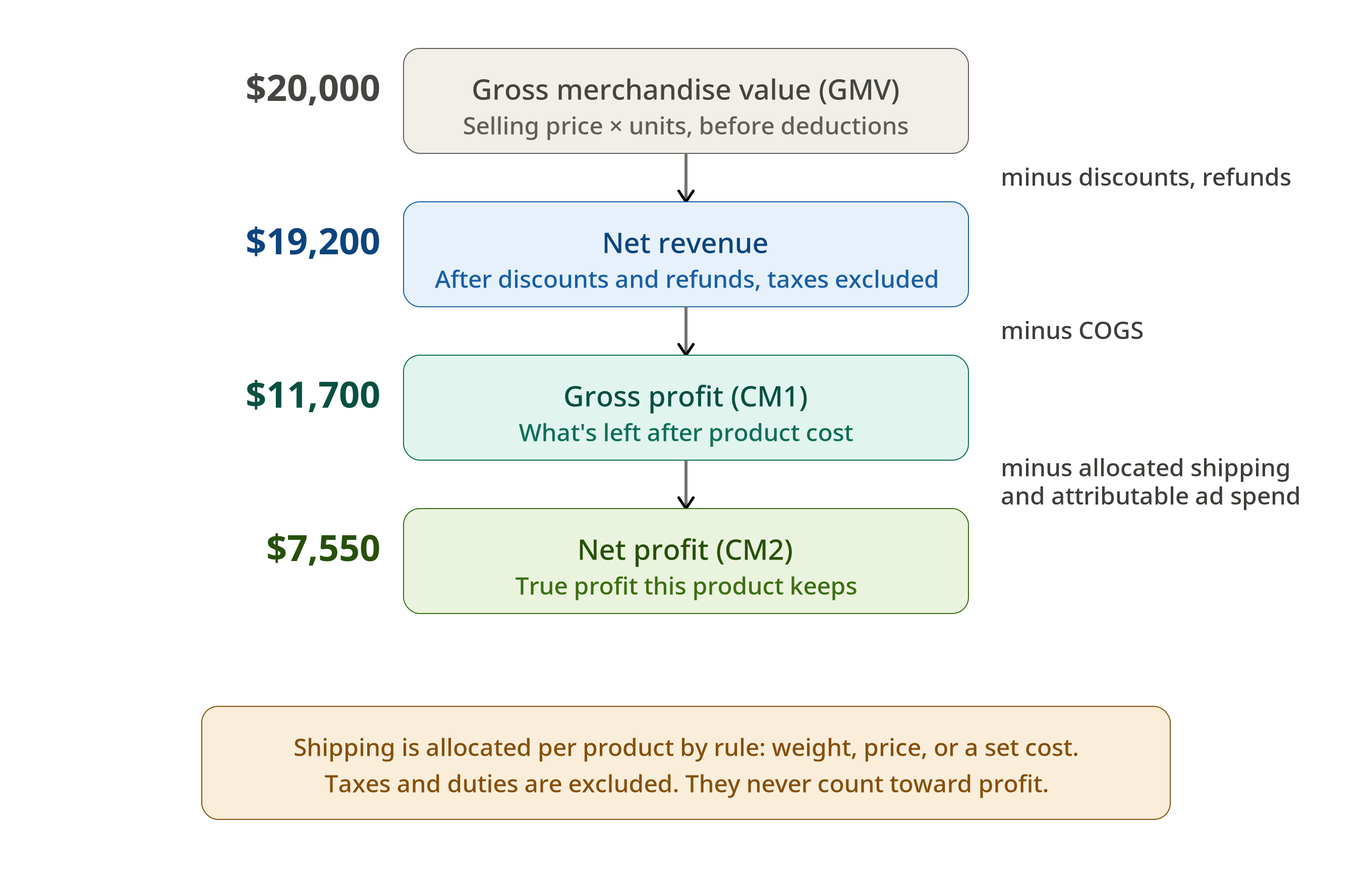
Healthy. But notice you have not touched a single marketing dollar yet. That comes next, and it is usually where the comfortable number starts to shrink. Keep this product in mind, we will come back to it.
How Should You Handle Shipping In Product-Level Profit?
Allocate shipping to products with a rule rather than splitting it evenly. Shopify records shipping at the order level, and an order can hold several products, so dividing one shipping charge equally across them distorts each product's true cost. A rule based on weight, price, or a set per-product shipping cost spreads it fairly and lets shipping count toward product profit.
Picture an order with three products and one $8 shipping cost. Splitting it evenly punishes a light, cheap item the same as a heavy, bulky one, which is rarely how shipping actually works. A weight-based or price-based rule sends more of that $8 to the item that really drove the cost.
That is the difference between a guess and an allocation. Done blindly, shipping distorts your margins. Allocated with a sensible rule, it turns an order-level total into an honest per-product cost. Bloom can apply these rules automatically, so each order's shipping lands on the right products instead of sitting in a lump you have to ignore.
How Do You Calculate Net Profit For A Product?
To estimate a product's net profit, subtract the costs you can fairly tie to it from its gross profit: its allocated shipping and the ad spend you can attribute to it. Operating expenses like rent, software, and salaries are shared across the business, so they sit at the store level, not on a single product.
Product net profit = Gross profit − Allocated shipping − Attributable ad spend
Why these two costs and not the rest of your overhead? Because both can be traced to one product:
Shipping can be allocated by weight, price, or a set per-product cost.
Ad spend can be pulled per product if you build your campaigns, ad groups, or ads around products.
Salaries and subscriptions cannot be split that cleanly, so pinning them on one SKU would only mislead you.
Now run it on the $80 product from earlier:
Gross profit $11,700
Allocated shipping ($7 × 250) $1,750
Attributable ad spend $2,400
Net profit $7,550 (margin: 61% to 39%)
Still strong. This is a genuinely good product.
But notice the pattern. Each honest cost narrows the gap between what a product sells and what it keeps. A high-margin item like this one absorbs the hit and stays healthy. A thinner one can give up its whole margin right here and cross into the red, which is exactly what the next section shows.
Watch this: Only count paid marketing you can attribute to specific products. Leave out organic and brand-level work like SEO, content, and general social, because those lift the whole business, not one SKU. To judge marketing efficiency across every channel at once, use MER (marketing efficiency ratio) at the store level instead.
If you think in contribution margin, this is the bottom of the ladder:
CM1: gross profit, after product cost
CM2: after shipping and ad spend, the number to watch day to day
CM3: after operating expenses
Product-level analysis lives at CM1 and CM2, with shipping and ad spend allocated to each SKU by rule.
Best Seller Versus Best Earner: A Side-By-Side
You just walked through that $80 product. Call it Product B. Now put it next to the store's actual best seller, Product A, over the same month, with the same math applied to both, shipping allocated by weight.
Metric | Product A (the "best seller") | Product B (the one you just calculated) |
Selling price | $30 | $80 |
Units sold | 1,000 | 250 |
GMV | $30,000 | $20,000 |
Discounts + refunds | $4,500 | $800 |
Net revenue | $25,500 | $19,200 |
COGS | $18,000 | $7,500 |
Gross profit | $7,500 | $11,700 |
Gross margin | ~29% | ~61% |
Allocated shipping | $4,000 | $1,750 |
Attributable ad spend | $6,000 | $2,400 |
Net profit | -$2,500 | $7,550 |
Net margin | ~ -10% | ~39% |
Product A wins every sales chart in the building. It moved four times the units and posted higher revenue. Yet once you allocate its shipping and subtract the ads that drove it, Product A loses money on every order, while the quieter Product B keeps about 39 cents of profit on every dollar of net revenue.
That is the whole case for product-level profit in one table. If you scaled spend based on the sales report, you would pour budget into a product that bleeds cash. Margin is what tells you which one actually deserves it.
Where product-level profit stops being reliable
Product-level profit is a strong directional signal, not a perfect ledger. Allocated shipping is a rule-based estimate rather than the exact carrier charge for each item, and broad marketing and operating expenses cannot be assigned cleanly to a single SKU at all. So treat product margins as a way to spot patterns and rank your catalog, not as audited per-product accounting.
That limitation does not weaken the exercise. You do not need perfect numbers to make better decisions. The costs you can measure already tell you which products carry the business and which ones quietly drain it.
What you do with that is the real point:
Reprice or renegotiate the thin-margin products before they erode your blended profit.
Protect and scale the high-margin earners, even when they are not your loudest sellers.
Cut or rework anything that turns negative once allocated shipping and ad spend come out.
Doing this by hand works for a short list. It gets painful fast across a full catalog, which is where a profit and marketing attribution app for Shopify stores earns its place: Bloom labels every product by what it truly keeps, flags the ones that look profitable on revenue but lose money after costs, and updates as your numbers move, so the analysis you just did once happens continuously across your whole store.

Frequently asked questions
What is a good profit margin for a Shopify product?
There is no single benchmark, because margins vary widely by category, price point, and sourcing. As a working guide, a gross product margin above 30% to 40% gives you room to absorb ad spend and still keep profit, while anything in the single digits is fragile once marketing and fulfillment come out.
Should I include shipping when calculating product profit margin?
Yes, if you allocate it with a rule. Shopify records shipping per order, so dividing it evenly across the products in an order distorts each one's margin. Instead, allocate it by weight, by price, or by a set per-product shipping cost. Done that way, shipping becomes an honest per-product cost and gives you a truer net profit. Done blindly, it misleads you.
Does Shopify calculate product profit margin automatically?
Shopify shows revenue and lets you enter a cost per item, so it can surface basic gross profit if your costs are filled in. It does not pull in discounts, refunds, attributable ad spend, and shipping in one true profit-per-product view. For that, merchants typically connect a dedicated profit analytics app that combines Shopify data with ad and cost data.
Why does my best-selling product make so little profit?
High sales volume often comes from low prices, heavy discounting, or aggressive ad spend, all of which compress margin. A product can lead your sales report and still keep very little after COGS, discounts, refunds, and the ads that drove it. Calculating profit per product is the only way to see whether your top seller is also a top earner.
How do I calculate profit margin across multiple products at once?
You can run each product through the formula or a calculator one at a time, which works for a handful of SKUs. For a full catalog, that becomes slow and error-prone, so most stores use a profit analytics tool that calculates margin for every product automatically from connected order, cost, and ad data, then ranks them.
If you would rather see this across your whole catalog instead of one product at a time, Bloom is free to try on Shopify, and the consultation call is also free if you want a walkthrough of your real numbers first.
Discover More