Clean Steps to Calculate Shopify Net Profit
Learn how to calculate Shopify net profit margin step by step using a simple funnel: revenue to Contribution Margin 1, Contribution Margin 2, Contribution Margin3, and Net profit. Track it daily to grow sustainably.
Net profit, or net income, is the bottom line for any business, especially in ecommerce. It answers a fundamental question: "How much money did my Shopify store actually keep?" Knowing your net profit helps you assess the financial health of your business and make informed decisions to drive sustainable growth.
Here is the catch most sellers miss: Shopify's built-in reporting stops at gross profit. Once you enter your cost per item, it shows you:
Gross Profit = Net Revenue - Cost of Goods Sold
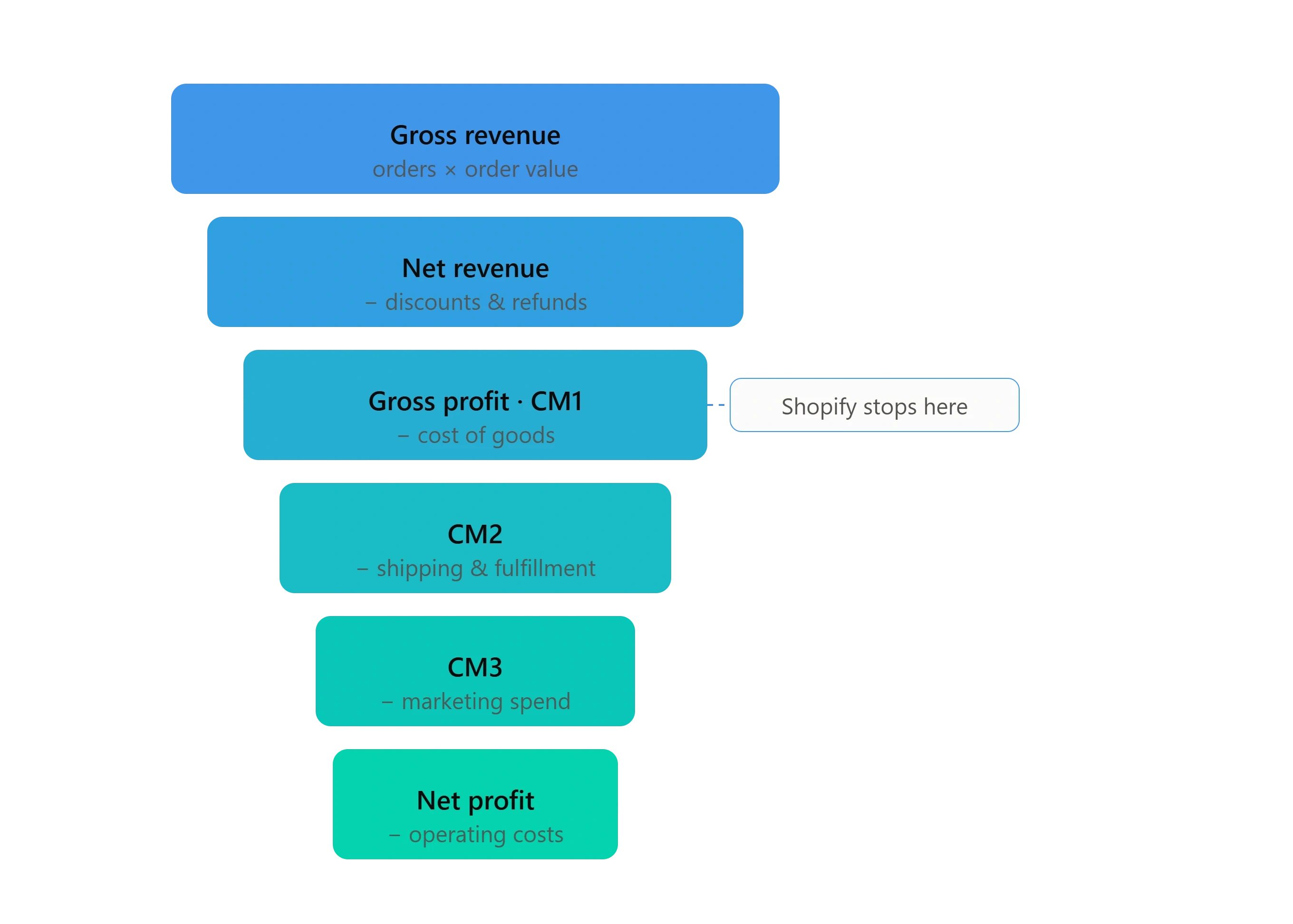
And that is where it ends. It does not subtract shipping, fulfillment, marketing spend, transaction fees, or operating costs. So the "profit" number you see in Shopify is not what you take home. To find your true net profit, you have to keep going past the point Shopify stops.
Net Profit Is a Funnel, Not a Single Subtraction
The most useful way to think about net profit is as a funnel. Your money starts wide at the top with revenue, then narrows at every step as costs come out, until you are left with what you actually take home. Each level of the funnel tells you something the others cannot. Shopify shows you the first couple of levels. The rest is on you to track.
The Importance of Tracking Shopify Net Profit Margin
Your Shopify net profit margin is the percentage of revenue that remains after all costs and expenses. A higher margin means a more profitable business. By tracking it regularly, you can spot trends, catch problems early, and make sure your pricing holds up.
Step-by-Step: How to Calculate Net Profit from Shopify
Work down the funnel one level at a time:
Net Revenue = Gross Revenue - Discounts - RefundsGross Profit (CM1) = Net Revenue - Cost of Goods SoldContribution Margin 2 (CM2) = CM1 - Shipping & Fulfillment CostsContribution Margin 3 (CM3) = CM2 - Marketing SpendNet Profit = CM3 - Operational Expenses
Why map every level instead of subtracting all your costs at once? Because when profit drops, the funnel tells you exactly where it went. A rising shipping bill shows up at CM2. A bad ad month shows up at CM3. One flat number cannot show you that. The funnel can. For a deeper look at organizing these costs, see our guide on Shopify profit and loss statements.
Tracking It Day to Day
The simplest way to start is to build this funnel step by step in a spreadsheet and update it as orders come in. Check it once a day and you will always know where your money is going.
If the daily tracking starts to feel like too much to handle, that is when a tool like Bloom profit analytics can take it off your plate, pulling your orders, costs, shipping, and ad spend automatically and building the whole funnel for you. Either way, the funnel is the point: know your levels, and you will never be surprised by your own bottom line.
Frequently Asked Questions
What's a good net profit margin for Shopify stores?
It varies by industry and business model, but a 10-20% net profit margin is generally considered healthy for ecommerce. Aim for the higher end as you optimize your operations.How often should I check my Shopify net profit?
Ideally daily or weekly, so you catch cost and margin trends early rather than at month end.Can I calculate net profit without an app?
Yes. You can build the funnel manually in a spreadsheet using the formulas above and data from your Shopify reports. It just gets more time-consuming and error-prone as your store scales.
Know Your Real Profit And
The Ads That Actually Sell.
No need to spend. Just try it on your store.