


To calculate contribution margin, subtract your variable costs from net revenue: Contribution Margin = Net Revenue − Variable Costs. Divide that result by net revenue and you get your contribution margin ratio, the percentage of every sale left over to cover fixed costs and turn a profit.
Contribution margin is not net profit. It's the layer before net profit: it tells you whether each sale leaves enough room to cover your fixed costs (rent, salaries, software) and still come out ahead. If your contribution margin is negative, no amount of volume will save you, you lose money on every order.
Contribution Margin Formula
There are two versions, and the difference matters:
In currency: Contribution Margin = Net Revenue − Variable Costs
As a ratio (%): Contribution Margin Ratio = (Net Revenue − Variable Costs) ÷ Net Revenue
The formula is simple. The real work is getting the two inputs right.
Net Revenue = Gross Revenue − Discounts − Refunds. Refunds and discounts are both subtracted, since neither is money you keep.
Variable costs are the costs that scale with each sale: product costs (COGS), fulfillment (shipping, pick-and-pack, payment processing fees), and marketing spend.
How to Calculate Contribution Margin Step by Step
Get net revenue right. Start from gross revenue, then subtract discounts and refunds.
Total your variable costs. Add up COGS, fulfillment, and marketing for the same period.
Subtract, then divide. Net revenue minus variable costs is your contribution margin in dollars; divide by net revenue for the ratio.
Worked example for one month:
Line item | Amount |
Gross revenue | $10,000 |
− Discounts | $1,000 |
− Refunds | $500 |
Net revenue | $8,500 |
− Variable costs (COGS $3,000 + fulfillment $1,200 + marketing $2,000) | $6,200 |
Contribution margin | $2,300 (27%) |
That $2,300 is what's available to cover fixed costs and profit.
Ecommerce Contribution Margin: The CM1, CM2, CM3 Waterfall
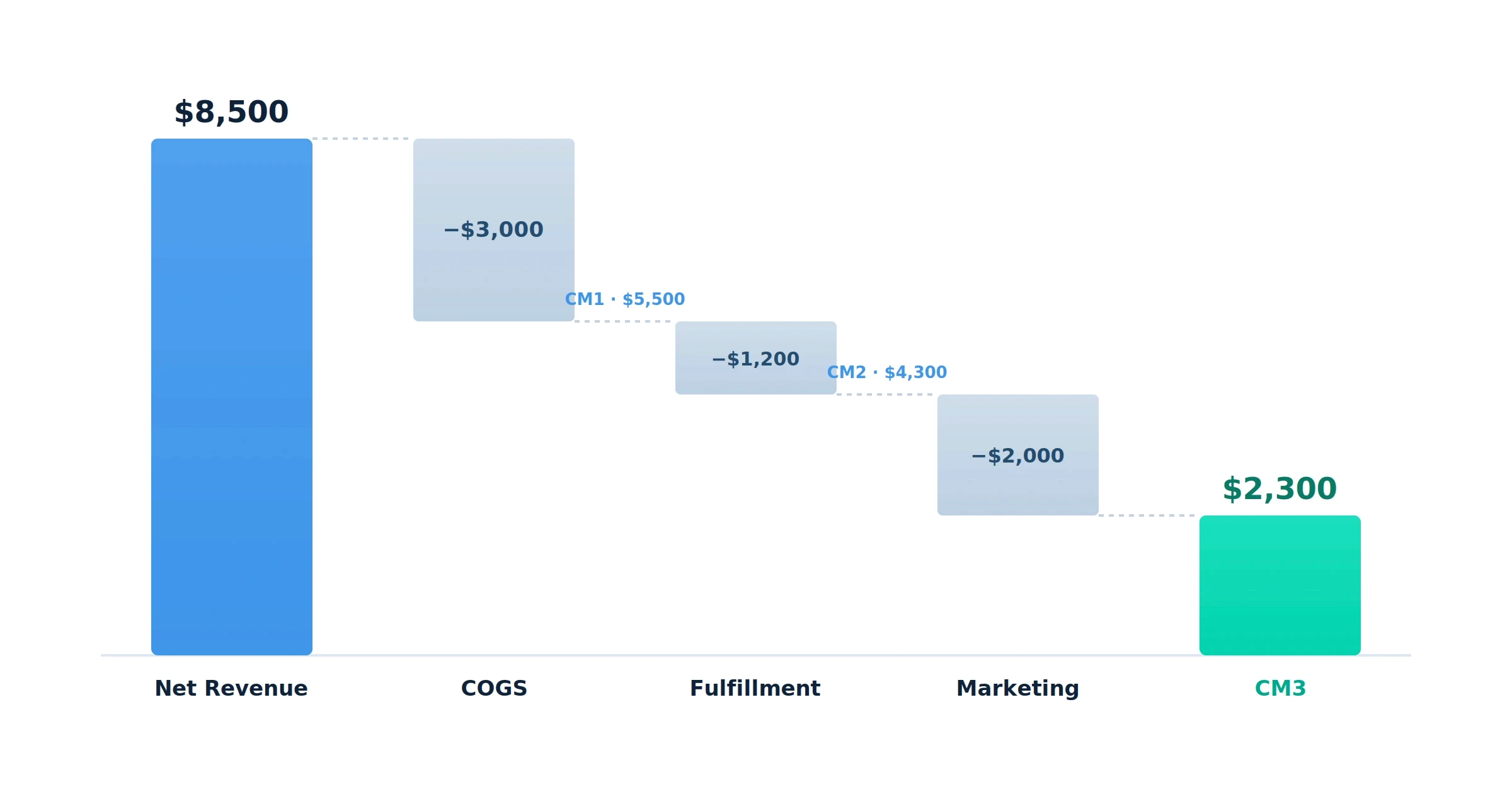
For an ecommerce brand, a single contribution margin number hides where the money actually goes. It's more useful as a waterfall, peeling off one cost layer at a time:
Contribution Margin 1 (CM1) = Net Revenue − COGS. Your product-level margin. Using the numbers above: $8,500 − $3,000 = $5,500 (65%).
Contribution Margin 2 (CM2) = CM1 − Fulfillment. Shipping, pick-and-pack, and payment processing come out here: $5,500 − $1,200 = $4,300 (51%).
Contribution Margin 3 (CM3) = CM2 − Marketing Spend. $4,300 − $2,000 = $2,300 (27%).
One precision point most guides get wrong: at CM3, "marketing spend" is broader than ad spend. It includes influencer and affiliate payouts, agency fees, and your email/SMS tools, not just what you send to Meta and Google. Keep "ad spend" for ROAS math; use "marketing spend" for CM3.
Contribution margin is not gross profit. CM1 alone maps to gross profit (net revenue minus COGS). Once you move past CM1 to account for fulfillment and marketing, you're measuring something broader, so the two terms aren't interchangeable beyond that first tier.
Frequently Asked Questions
Is contribution margin the same as gross profit?
Only at the first tier. Gross profit equals net revenue minus COGS, which is CM1. Full contribution margin (CM3) also subtracts fulfillment and marketing, so it's a lower, more complete number than gross profit.
Does contribution margin include marketing spend?
At the CM3 level, yes. CM1 and CM2 don't touch marketing, but CM3 subtracts all marketing spend like ads, influencer and affiliate payouts, agency fees, and email/SMS tools to show what's genuinely left after acquiring the sale.
Discover More