

Quick answer: Shopify COGS (cost of goods sold) is the direct cost of the products you sell, calculated as Beginning Inventory + Purchases − Ending Inventory. Shopify stores one cost per product in its "Cost per item" field, so when supplier prices change, you need a valuation method (FIFO or weighted average cost) to keep your numbers accurate. Here is how to do it.
Cost of Goods Sold (COGS) sits at the top of your P&L statement and is central to understanding your store's profitability.
Sell a product for $50, buy it for $20, and make $30. That works well for stores with consistent product costs. But anyone running a Shopify store knows it's rarely that simple. Supplier prices move, extra costs appear, and not every expense fits neatly into Shopify's default cost fields. Over time, these small gaps distort the real profit behind each sale and your overall profitability.
This article walks through how to calculate COGS in Shopify, where the common reporting gaps show up, and how to track your cost of goods sold accurately when prices keep changing.
Why Accurate COGS Matters
COGS is the foundation of every profit number below it. Get COGS wrong and your gross profit, contribution margin, and net profit are all wrong by the same amount, in the same direction.
Here is how it connects:
Gross Profit = Revenue − COGS
Gross Margin = (Revenue − COGS) ÷ Revenue
Gross profit is the starting point. From there you subtract fulfillment and marketing to get contribution margin, then operating expenses to get net profit. If the first number is off, every margin after it inherits the error.
That is why accurate COGS is worth the effort. It tells you the true profit behind each product, lets you see margin slip as supplier costs rise, and keeps your gross margin and net profit reporting honest enough to make decisions on.
What's Included in COGS (and what isn't)
COGS includes the direct costs of producing or acquiring the products you sell. It does not include the cost of running the business around those products.
Included in COGS:
Raw materials: the basic inputs used to make your product
Direct labor: wages paid to people directly producing or assembling the product
Packaging: materials used to package the product before it ships
Manufacturing overhead: for merchants who produce their own goods, the production-related share of rent, utilities, equipment, and supplies
Import duties and customs fees: taxes paid when importing inventory
Inbound freight: the cost of moving inventory from your supplier to your warehouse
Not COGS (these are operating expenses, and mixing them in is one of the most common mistakes):
Marketing and ad spend
Shopify fees and payment processing fees
Rent, salaries, and software
Outbound shipping to the customer (treated as a fulfillment cost, not product cost)
The reason this line matters: if you fold ad spend or Shopify fees into COGS, your gross margin looks worse than it is and your operating costs look better than they are. Keep product costs in COGS and everything else in operating expenses, and the rest of your P&L falls into place.
How to Add Cost of Goods Sold in Shopify
Shopify gives you a Cost per item field on each product or variant. To use it, go to the product page in your admin, find the Cost per item field under Pricing, and enter what that product costs you. You also need to turn on inventory tracking for the product, or Shopify can't apply the cost to sales.
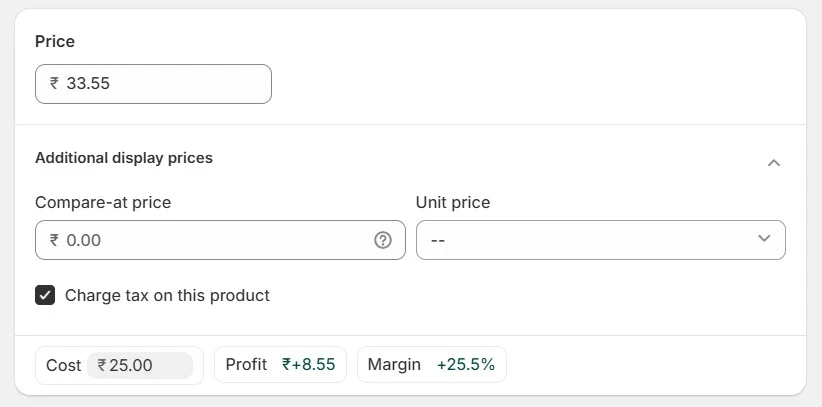
When a sale happens, Shopify multiplies the cost per item by the units sold to record COGS for that order. For example, a cost per item of $20 on a 5-unit order records $100 of COGS.
Where to Find the Shopify COGS Report
Once costs are in, your COGS data shows up in the Finances Summary report and the Profitability report under Analytics → Reports → Finances (available on the Shopify plan and higher). The Shopify cost of goods sold report summarizes COGS for a date range and shows it as a percentage of revenue, while the Profitability report ties revenue, cost, and inventory together so you can see which products earn the most.
This setup works fine when two things are true:
Your product costs stay constant
You buy inventory at the same price every time
For a lot of merchants, neither holds for long. Here is where it breaks.
The Problem: Shopify Only Stores One Cost Per Product
Shopify's Cost per item field holds a single static cost per product or variant. That creates two issues the moment your costs move.
It can't hold two prices at once. If you have existing stock bought at one price and a new batch arrives at a higher price, there is nowhere to record both. You are forced to pick one number, and whichever you pick is wrong for half your inventory.
Updating the cost rewrites your history. Shopify applies the current Cost per item value to past reports too. Say a product cost $10 and you sold 50 units, recording $500 of COGS. If you later update the cost to $15 to reflect a supplier increase, your older reports now show that batch at $15 as well. Your past gross profit silently shifts, and you can no longer trust period-over-period comparisons.
For a store with a handful of stable SKUs, this is a minor annoyance. For a growing brand with rising supplier costs and multiple batches in flight, it quietly corrupts the numbers you use to set prices.
How to Calculate COGS in Shopify When Prices Keep Changing
When you buy the same product at different prices over time, you need an inventory valuation method to decide which cost applies to the units you sold. The two that fit most DTC brands are FIFO and weighted average cost. (A third method, LIFO, assigns the newest cost first. It's allowed in the US but banned under international accounting standards, and most ecommerce brands skip it.)
FIFO (first in, first out) assumes you sell your oldest stock first, so the oldest cost is the one that hits COGS. It usually matches how physical products actually move, especially anything perishable or seasonal.
Weighted average cost blends every unit into one average cost, regardless of when you bought it. It's simpler to maintain and works well for large quantities of identical items.
Here is the difference in practice.
Imagine a store selling a candle. The first batch is 200 units at $6 each ($1,200). Two months later the supplier raises prices, and the second batch is 200 units at $9 each ($1,800). During the next month the store will sell 300 units.
FIFO: the first 200 units come from the $6 batch and the next 100 from the $9 batch. COGS = (200 × $6) + (100 × $9) = $2,100.
Weighted average: total inventory cost is $3,000 across 400 units, or $7.50 per unit. COGS = 300 × $7.50 = $2,250.
Same 300 sales, a $150 difference in reported cost, and a $150 difference in reported profit. Multiply that across every SKU and every month and the gap is the difference between a price that protects your margin and one that doesn't.
Now look at what Shopify's single field would do with the same scenario. If Cost per item still reads $6, it records 300 × $6 = $1,800 and overstates your profit by hundreds of dollars. If you update it to $9, it records 300 × $9 = $2,700 and back-applies $9 to your earlier $6 sales too, overstating cost and distorting last month's report. Neither matches what the candles actually cost you.
The fix is to track cost by the period or the batch it applies to, so the right cost lands on the right units, and your history stays put.
How to Track Changing COGS Without the Spreadsheet Headache
You can do this in a spreadsheet, and plenty of merchants start there. It works until you have enough SKUs and batches that the monthly reconciliation eats an afternoon and a typo in one cell quietly throws off your margins.
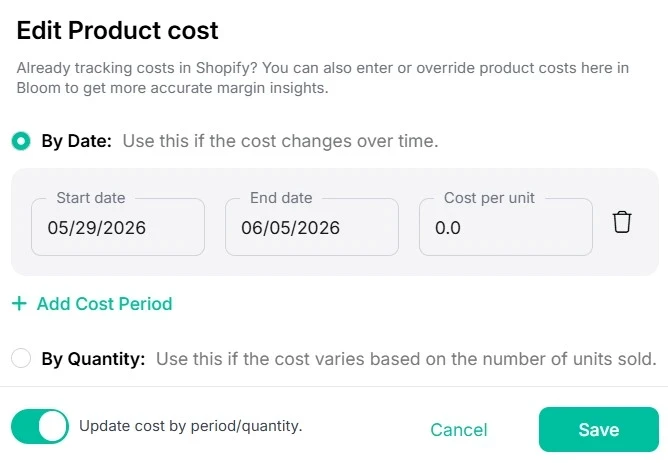
This is the kind of cost tracking Bloom, our profit and attribution app for Shopify stores, is built to handle automatically. Bloom pulls product costs straight from Shopify, and when you need more flexibility than a single cost field allows, you can define costs directly in Bloom instead.
What that gives you in practice:
Costs that follow your batches. You can assign a cost to a date range, so a price increase applies from the day it took effect forward, not retroactively across your whole history. If cost depends on order volume instead, you can set quantity ranges so the right cost applies to the right units.
History that stays accurate. When a new batch costs more, you record the new cost without overwriting the old one. Your past COGS stays correct, so last quarter still reads the way it actually happened.
Updates without the manual grind. Record a cost change once and it flows into reports within a few hours and applies automatically to future orders that match the rule. No re-entering the same number every time you reorder.
The point isn't the mechanism. It's that you can open your profit report and trust the gross and net margin numbers enough to act on them, whether that means raising a price to protect margin or cutting a product that stopped earning.

Frequently Asked Questions
Does shopify automatically calculate COGS?
Not on its own. You have to enter a Cost per item for each product and turn on inventory tracking. Once you do, Shopify applies that cost to units sold and reports COGS for you. What it won't do is figure out the cost itself, hold more than one cost per product, or adjust for supplier price changes over time. Those parts are still on you.
Where is the COGS report in shopify?
Go to Analytics → Reports → Finances in your Shopify admin. The Finances Summary report and the Profitability report both show cost of goods sold, available on the Shopify plan and higher. If COGS isn't showing, the most common reason is that the Cost per item field is empty or inventory tracking is off for those products.
Does shopify use fifo or weighted average cost?
Shopify's Cost per item field stores one static cost per product, so it doesn't run true FIFO or weighted average across multiple batches on its own. You choose a valuation method (FIFO or weighted average are the common ones for DTC) and either maintain it manually or use a tool that tracks cost by date or batch. Pick one method and apply it consistently.
Why do my COGS change in old shopify reports?
Because Shopify applies the current Cost per item value to past orders too. When you update a product's cost to reflect a price increase, older reports re-calculate at the new cost, so last month's gross profit shifts even though nothing about those past sales actually changed. Tracking cost by the period it applied to keeps historical reports stable.
Track COGS the Way it Moves in Your Business
Accurate COGS is the foundation of reliable profit reporting. Shopify's default cost field works for stores with steady prices, but growing brands with shifting supplier costs need more flexibility than a single number allows.
You can try Bloom free on Shopify, or book a free consultation call if you'd rather have someone walk through your store's profit picture with you first.
Discover More