A high order count can make a great-looking month. The question that matters is quieter: are those orders actually adding to your bottom line, or just moving cash through the business? You cannot know until you see the full cost mix on each order.
An order rarely goes thin by accident. Sometimes it's a choice you made about a discount, a markup, or a shipping promise. Other times it's outside your control, like a carrier rate hike or a payment fee that creeps up as the cart gets larger. Either way, the only way to catch it is to watch profit at the order level and see how every cost tied to that order moves over time.
This guide walks through how to calculate profit on a single Shopify order, why the number on your dashboard hides the real one, and how to use order-level insight to make sharper calls on pricing and scaling.
TL;DR
Revenue per order tells you almost nothing. The same order can look healthy on the dashboard and lose money once you subtract product cost, discounts, refunds, and fulfillment.
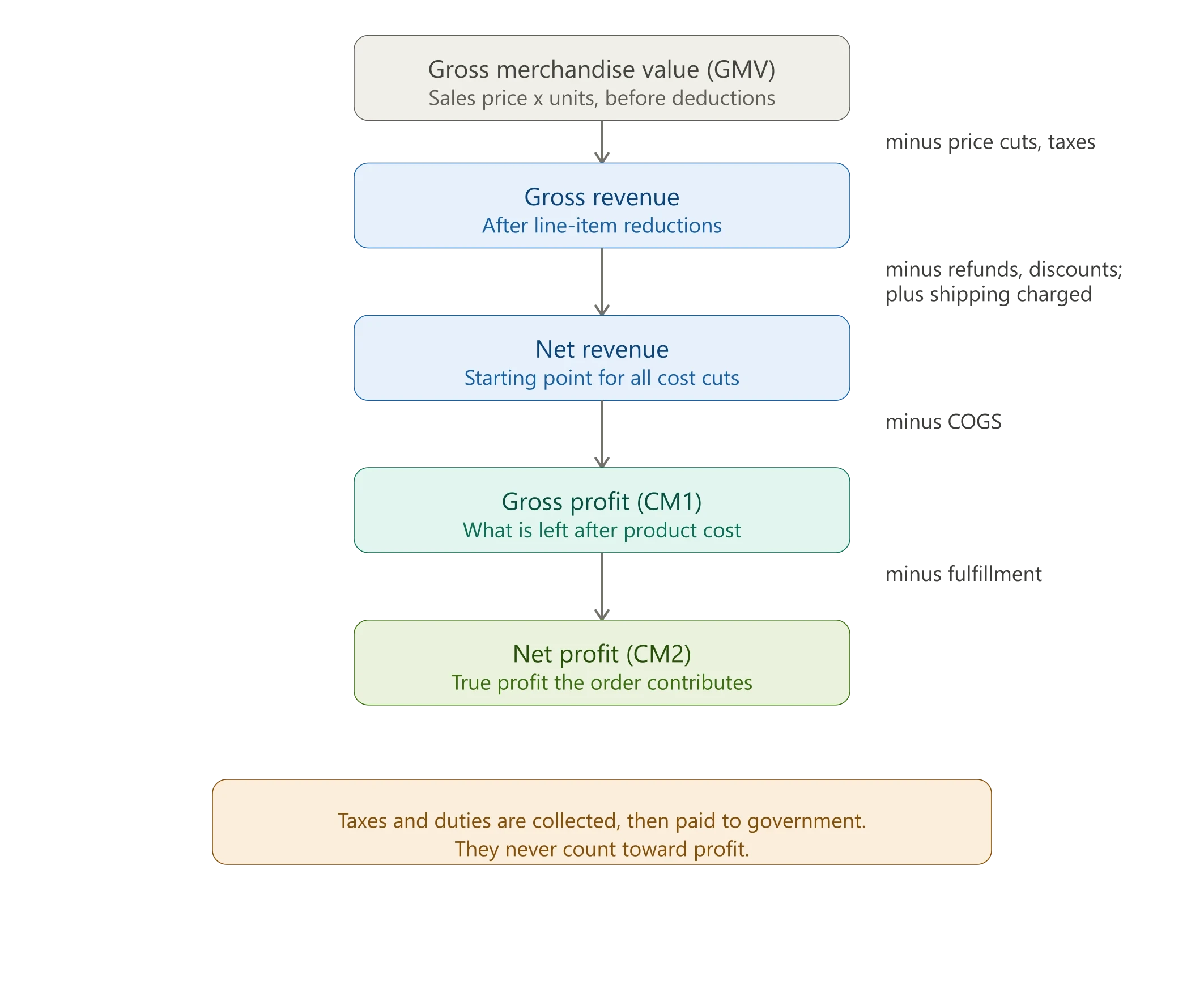
Order-level profit follows a clear chain: GMV, then gross revenue, then net revenue, then gross profit (CM1), then profit after fulfillment (CM2).
The biggest order-level margin killers are over-discounting, shipping overruns, frequent refunds, payment fee spikes, and heavy or bulky products.
You can calculate this by hand for a few orders. Across hundreds of orders with costs that move weekly, you need a system that pulls it together automatically.
What is Order-Level Profit Margin?
Order-level profit margin is what you actually keep from a single order after every cost tied to that order is subtracted: product cost, discounts, refunds, and fulfillment. It is different from product margin, because a product with a strong margin on its own can still produce a weak or negative order once discounts and shipping land on it.
Strong product margins do not guarantee strong orders. Inside an order you deduct several cost layers at once, and sometimes the profit left over is not enough to cover them. That is why two orders with identical revenue can have very different bottom lines.
Calculating profit at the order level shows whether each sale genuinely contributes after everything is accounted for. Once you can measure it, you can see which line items drag a margin down, and which prices, fees, or policies need adjusting to keep orders consistently profitable.
So how do you actually get to that number? Here is the full breakdown.
How is Shopify Order Profit Calculated?
Shopify order profit is calculated by starting from gross merchandise value and subtracting each cost layer in order: price reductions and taxes, refunds and discounts (adding back customer-paid shipping), product cost (COGS), and finally fulfillment costs. What remains is your true profit on that order.
Here is the chain from top-line sales value down to what you keep:
Gross merchandise value (GMV)
GMV is the real sales volume of an order before any deductions. It is the big number that makes a dashboard look healthy, and it is the worst possible stopping point if you want to know what you keep.
To find GMV, calculate it per product, then add them up:
GMV = sale price x units sold
Take an order with three line items. Product 1 sells two units at $30 ($60), product 2 sells one unit at $20 ($20), and product 3 sells one unit at $19 ($19). The order GMV is $99. Nothing has been subtracted yet, so this number tells you almost nothing about profit.
Gross revenue
Gross revenue is GMV after you remove any reductions applied at the product or line-item level, and after you strip out taxes that were baked into the product price or collected across the order.
Gross revenue = GMV - price cuts - taxes
The excitement from that GMV figure lasts right up until the deductions start.
What is net revenue, and why does it matter most?
Net revenue is gross revenue after refunds and discounts are subtracted and customer-paid shipping is added back. It matters most because it becomes the starting point for every remaining cost deduction, so an error here flows through the entire calculation.
Net revenue = gross revenue - refunds - discounts + shipping revenue
This is where the biggest margin killers hide. Three components do the damage:
Refunds. Include every type tied to the order: full refunds, partial refunds, chargebacks, and any refunded shipping.
Discounts. Not all discounts work the same way. Some apply to the whole cart, some to specific products, some come through offers like buy-one-get-one, and some arrive as codes like free shipping. Count all of them. This is the only way to see how much room you actually have to discount without eating your margin.
Shipping revenue. Add what the customer paid to ship that order. It lifts the order's revenue back up.
Get net revenue right. Everything downstream depends on it.
Total revenue
Total revenue adds taxes and duties back on, purely for reporting inside a dashboard.
Total revenue = net revenue + taxes + duties
One caution that trips up a lot of stores: tax, duties, and tips collected are passed back to the government or staff. They are not yours. Exclude them from every profit calculation that follows.
How do you calculate gross profit (CM1) on an order?
Gross profit, or CM1, is net revenue minus the cost of goods sold for that order. It shows whether your pricing choices hold up once you account for what you actually paid for the products.
Gross profit (CM1) = net revenue - COGS
Here COGS is the sum of product costs inside the order. Product costs drift over time, but Shopify updates them automatically. If you ever need to override a cost manually, you can add it yourself.
Net profit (CM2): what the order really contributes
Net profit, or CM2, is gross profit minus fulfillment costs. At the order level this is your true profit, because it is what remains after both the product and the cost of getting it to the customer.
Net profit (CM2) = gross profit - fulfillment cost
Fulfillment cost here means shipping, handling, tariffs, and payment processing fees. Two things move it around:
Shipping and handling shift with order size, weight, destination zone, and carrier. Payment processing fees scale with the order amount, so a big cart can quietly carry a bigger fee than you expect.
One quick framing note so this lines up with how profit is tracked across a store rather than a single order. At the order level, CM2 is your profit after product and fulfillment costs, and that is the natural floor for a single order. Ad spend and operating costs like software, rent, and labor do not attach cleanly to one order, so they enter at the store level instead. This is the kind of full-stack profit view that Bloom, our profit and marketing attribution app for Shopify stores, builds automatically from your order data once you set up your costs.
What are the Most Common Order-Level Margin Killers?
The most common order-level margin killers are over-discounting, shipping cost overruns, frequent refunds or returns, payment fee spikes, heavy or bulky product penalties, and bundles that quietly erase profit. Each one chips away at CM2 without ever showing up on a revenue report.
Here is what to watch for:
Over-discounting. Stacked codes and cart-level promos that push the order below break-even.
Shipping cost overruns. Charging a flat rate while paying a variable, zone-based one.
High return and refund frequency. Products that sell well but come back often.
Payment processing fee spikes. Larger carts carry larger fees than you priced for.
Heavy or bulky product penalties. Dimensional weight charges that reduce the item's margin.
Bundles that erase profit. A discount on the bundle plus shipping on a heavier box.
How to Use Order-Level Insights to Protect Your Margins?
Once you can see profit at the order level, you can act on it. The fixes fall into six buckets, each tied to one of the margin killers above.
Pricing
If an order's revenue cannot absorb shipping, handling, fees, discounts, and refunds, your price is too low. Nudge it up. Remove SKUs that never contribute, or bundle them with a high-margin item so the stronger product carries the weaker one. If the problem is product cost, renegotiate with your vendor or find a friendlier one. If nothing fixes the margin, phase the product out.
Discounting
Offer discounts only on order patterns that stay profitable. Set a floor: only discount when the margin holds above a set percentage. That way every promo still leaves room for profit instead of blindly cutting revenue.
Shipping strategy
Set minimum order thresholds so only profitable carts qualify for free shipping. Replace flat rates with costs that reflect how you actually fulfill orders. Bloom supports flexible shipping cost rules based on fixed amounts, weight, and order value so you can model shipping costs more accurately around your specific fulfillment setup. Negotiate better carrier rates, and match the shipping method to actual delivery needs instead of paying for premium shipping customers did not request.
Fulfillment optimization
Lighten your packaging to cut dimensional weight charges. Pick carriers on the basis of who does the job well for the lowest cost on each route.
Payment processing fees
Offer a small incentive for lower-fee payment methods to soften sudden fee spikes. Consider a minimum order value so processing fees do not swallow the profit on tiny carts.
Refund costs
Find the products with high return rates. Fix quality issues or sharpen the product descriptions so expectations match reality. Offer exchanges instead of refunds where you can, to keep the revenue in the business.
Doing this Across Your Whole Store
Calculating profit on one order by hand is straightforward. Doing it across hundreds of orders, with COGS, shipping rates, and fees that change week to week, gets messy fast. Trends can flip overnight, and you end up guessing on the cost decisions that matter most.
This is where a system that pulls every order-level cost together and computes net profit automatically earns its place. You get real-time numbers, a clear view of which orders drain margin, and the ability to fix a leak before it spreads across a month of sales. Bloom builds exactly this from your Shopify data, so the order-level profit you just calculated by hand shows up on its own, on every order.
FAQs
Is Order-level Profit the Same as Gross Profit Margin?
No. Gross profit margin (CM1) only subtracts the cost of goods from net revenue. Order-level profit goes one layer further and subtracts fulfillment costs like shipping, handling, and payment fees to reach net profit (CM2). An order can show a healthy gross margin and still lose money once fulfillment is included, which is why both layers matter.
How do Refunds Affect Order Profit Margin?
Refunds hit harder than they look. A full refund removes the revenue but you often keep the shipping, payment fee, and sometimes restocking costs already spent, so the order can finish at a loss. Partial refunds and chargebacks do the same on a smaller scale. Tracking refunds at the order level shows which products quietly turn profitable sales into losses.
Can I Calculate Order-level Profit without a Tool?
Yes, for a handful of orders. Pull GMV, subtract price cuts and taxes, then refunds and discounts, add back shipping charges, subtract COGS, then subtract fulfillment. The problem is scale: across hundreds of orders with shifting costs, manual calculation breaks down and goes stale quickly. That is the point where automating it pays for itself.
Can I Add Shipping Costs at Order Level In Shopify?
Shopify on its own doesn't capture your true per-order shipping cost; it tracks what the customer paid, not what you paid the carrier. To get real shipping cost per order you connect your shipping platform so the actual label cost flows in against each order. Bloom pulls this carrier-level cost in automatically, so fulfillment is based on what you really spent, not an estimate.
Can I Add Product Cogs At The Order Level?
Yes. Product cost is set per variant, and Shopify carries that cost into each order automatically, so COGS is summed across the line items in the order without manual entry. When a cost changes, the update flows through to new orders. If a single order needs a one-off cost adjustment, you can override it manually rather than changing the variant's standing cost.
Discover More