


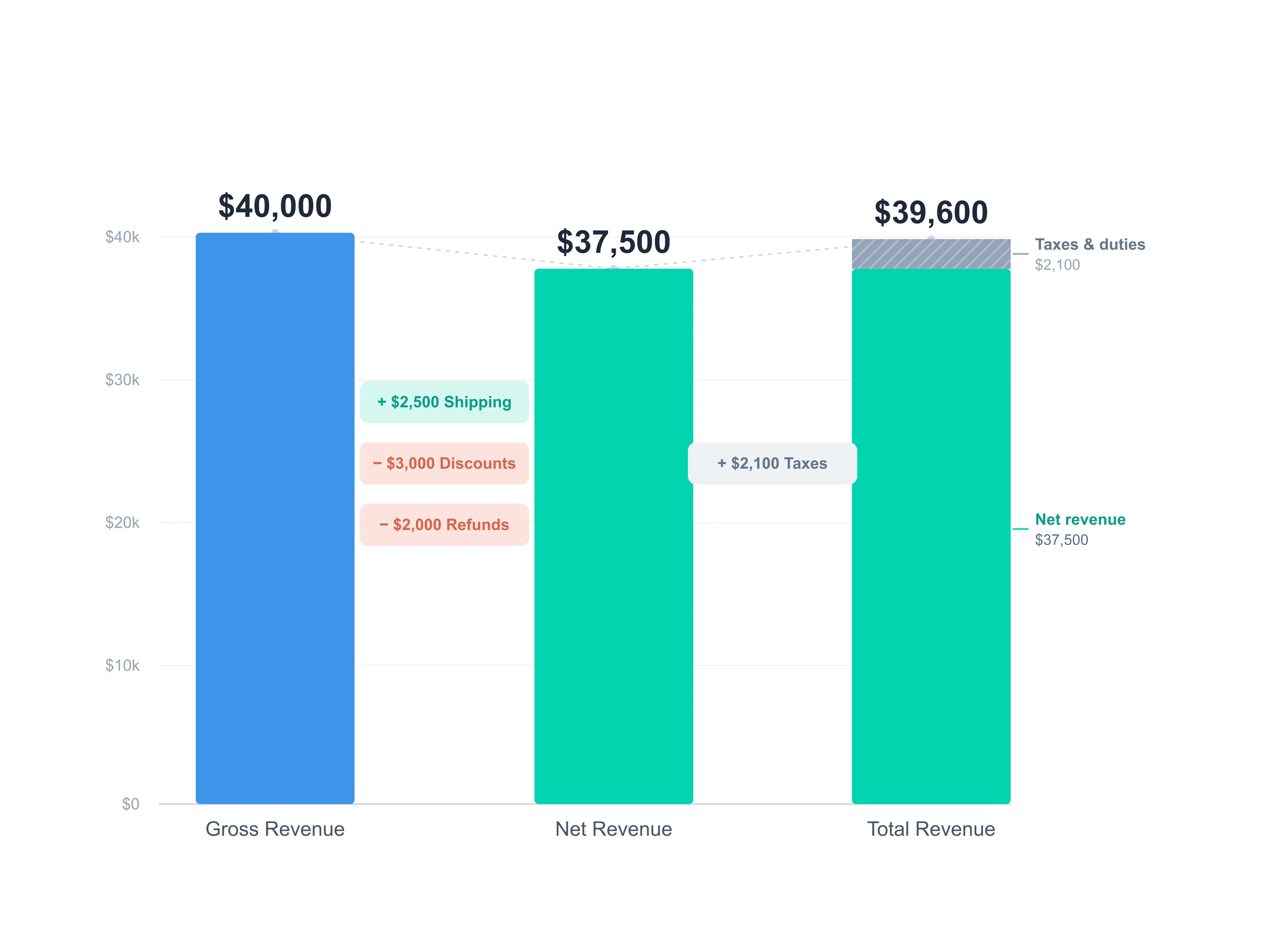
Revenue on Shopify is the total value of your sales, but it isn't a single number. You calculate it in three layers: gross revenue, net revenue, and total revenue. Getting all three right is what tells you which figure to feed into your profit margins and which one to leave out. Here is each layer, with one worked example running through all three.
How to Calculate Gross Revenue on Shopify
Gross revenue is your total product sales before any deductions. Nothing is subtracted yet for returns, refunds, or discounts. It's the rawest measure of demand.
Gross Revenue = Order Count × Average Order Value (AOV)
where AOV = Gross Sales ÷ Order Count
These are two views of the same number. Multiply order volume by average order value and you land back at gross sales. The AOV breakdown is useful for forecasting: push either lever (more orders, or a higher average basket) and gross revenue moves with it.
Example: 500 orders at an $80 AOV gives $40,000 in gross revenue.
This tells you how much you sold. It doesn't tell you how much you kept.
How to Calculate Net Revenue on Shopify
Net revenue is your revenue on hand: gross revenue after discounts and refunds, plus the shipping you charged customers. This is the money actually sitting in your business, and it's the figure you build profit margins from.
Net Revenue = Gross Revenue + Shipping Collected − Discounts − Refunds
Example: $40,000 gross + $2,500 shipping − $3,000 discounts − $2,000 refunds = $37,500 net revenue.
Shipping belongs here, not in a later pass-through layer, because it's money you keep. And since what you charge for shipping is often more than what fulfillment actually costs you, that gap becomes part of your margin rather than a wash. Taxes work the opposite way, which is why they sit in the next layer instead.
One note if you cross-check against Shopify: its built-in Net Sales report excludes shipping and reports it under Total Sales instead. We count shipping inside net revenue here because it's revenue on hand, but the final total revenue figure comes out the same either way. If your Shopify Net Sales number looks lower than the net revenue above, shipping is the reason.
How to Calculate Total Revenue on Shopify
Total revenue adds the one kind of money that flows through your store but was never yours: the taxes and duties you collect from customers to remit to the government.
Total Revenue = Net Revenue + Taxes + Duties
Example: $37,500 net + $2,100 taxes and duties = $39,600 total revenue.
That $2,100 is roughly 6% of taxable sales. US combined sales tax averages about 7.5%, but you only collect on orders shipped to states where you have nexus, so the effective share of your sales is usually lower. Notice that total revenue lands below gross revenue here: gross counts product sales only, while total layers tax on top of net, so the two are not directly comparable.
Keep taxes and duties out of any margin calculation. You are only holding that money until you pass it to the government, so counting it as revenue is one of the fastest ways to overstate how profitable your store really is.
Revenue is Not Profit
Knowing your revenue is only half the picture. Revenue is what came in. Profit is what you keep after COGS, shipping costs, ad spend, and every other expense. Shipping actually shows up on both sides: the shipping you charged is revenue, and the shipping you paid to fulfill orders is a cost, so your real shipping margin is the difference between the two. For the full breakdown across CM1, CM2, and CM3, read our guide to calculating profit on Shopify.
FAQ
Which revenue number should I use to calculate profit?
Net revenue. It's your revenue on hand after discounts and refunds, and it includes the shipping you charged, which is money you keep. Leave out taxes and duties, since those are collected for the government and were never yours.
Does net revenue include shipping on Shopify?
Treated as revenue on hand, yes. Shipping you charge customers is money you keep, so it belongs in net revenue. Note that Shopify's built-in Net Sales report excludes shipping and rolls it into Total Sales, so your admin figure may read lower than this definition.
Discover More