Shopify's Claude MCP connectors have been getting a lot of attention lately, and for good reason. The official Shopify AI Toolkit lets you connect your store directly to Claude, giving the AI access to your developer docs, GraphQL API, and admin operations. You can manage products, update themes, and query order data with plain-English prompts instead of clicking through screens.
That's genuinely useful. But the analysis stops at the edge of Shopify's own ecosystem.
Ask Claude "why did my profit drop last week?" through a Shopify MCP server and it won't have a complete answer, because the data behind that question lives in multiple places. Product costs, shipping expenses, payment processing fees, ad spend across Meta and Google, attribution data showing which campaigns actually drove purchases: none of that sits inside Shopify's admin. The Shopify MCP gives Claude access to revenue and orders. It doesn't give Claude access to profit.
This is where connecting a profit analytics layer through MCP changes the conversation. Instead of Claude reporting what sold, it can tell you what you actually kept, which products are losing money after costs, and which campaigns are worth scaling. This article covers how to set that up using Bloom Analytics, what kind of questions Claude can answer once it has your full profit picture, and where the limits are.
Key Takeaways
Shopify's MCP servers give Claude access to orders, products, and store operations, but not to costs, margins, or ad attribution.
Connecting Bloom Analytics via MCP feeds your layered profit data (revenue through to net profit) into Claude, so it answers from your real numbers.
Setup takes a few minutes with no coding. You install Bloom, connect your data sources, and add the MCP connector in Claude.
Claude works best as an analyst aide for "why did this happen" questions across multiple reports. It doesn't replace accounting or final judgment.
What Is MCP, and Why Does It Matter for Shopify Merchants?
MCP (Model Context Protocol) is an open standard that lets AI tools like Claude read data from other applications through a secure, authorized connection. For Shopify merchants, it means Claude can pull live numbers from your store and analytics tools, then answer questions about them in plain language, without you exporting a single file.
Before MCP existed, using AI on your store data meant exporting a CSV, pasting it into a chat window, and hoping you grabbed the right columns. Claude only saw the snapshot you gave it, and if you needed a follow-up answer, you had to go export something else.
MCP removes that friction. Claude connects to the data source once and reads from it directly. When you ask a follow-up, it pulls more context the same way an analyst would open another tab. That's the difference between a one-time paste and a working connection.
Shopify was one of the earliest ecommerce platforms to ship MCP support. By early 2026, Shopify had released multiple official MCP servers covering developer documentation, GraphQL schema validation, admin operations, and storefront data. Merchants can connect Claude to their store and ask questions about orders, products, customers, inventory, and sales using the data Shopify already holds.
That means Claude can answer questions like:
What was my revenue yesterday?
Which products sold the most units last week?
How many orders came in today?
How many refunds were issued this month?
These are solid starting points, and setting up the native connection is worth doing even if you plan to add a profit analytics layer later.
How Do You Connect Claude Directly to Shopify?
Shopify has made the native Claude connection straightforward. There are two paths depending on whether you're a merchant working in the Claude chat interface or a developer using Claude Code.
For merchants (no code required)
The simplest route is the official Shopify connector built into Claude.
Open Claude and go to Settings > Connectors.
Find Shopify in the connector list and click Connect.
You'll be redirected to your Shopify admin. Review the requested permissions and authorize.
That's it. Claude can now read your store data, orders, products, customers, inventory, and basic sales figures directly from Shopify. You can start asking questions like "what were my top-selling products last week" or "show me all unfulfilled orders from this month" and get answers without leaving the chat.
One thing worth noting: start with read-only access. You can always expand permissions later once you've built confidence in the workflow. Some merchants grant write access for product updates and collection management, but there's no rush.
For developers (Claude Code + Shopify AI Toolkit)
If you're building on Shopify or managing theme code, the Shopify AI Toolkit gives Claude Code deeper access. Shopify open-sourced the toolkit in April 2026 under MIT license, and it bundles developer documentation search, GraphQL schema validation, and live store operations through the Shopify CLI.
Install it with one terminal command:
claude mcp add --transport stdio shopify-dev-mcp -- npx -y @shopify/dev-mcp@latest
Once connected, Claude Code can look up how any Shopify API works, validate GraphQL queries against the live schema before you deploy them, and execute store operations with full context on your theme structure. It's a genuine productivity multiplier for Shopify development work.
What the native Shopify connection gives you (and where it stops)
With Claude connected directly to Shopify, you get solid coverage of store operations and sales reporting. Claude can pull order histories, product catalogs, customer segments, inventory levels, and discount usage. For day-to-day store management questions, that's often enough.
But the questions that drive growth usually need more context than Shopify holds on its own.
Why Does Claude Need More Than Shopify Data to Answer Profit Questions?
Revenue is not profit. Shopify tracks what comes in, but the costs that determine what you keep live across multiple systems: your supplier invoices, your shipping accounts, your payment processor, your ad platforms, your email and SMS tools. Shopify's MCP gives Claude the top line. It doesn't give Claude the full picture.
Here's a concrete example. Say your revenue grew 15% last month but your net profit stayed flat. Claude connected only to Shopify can confirm the revenue increase. It can show you which products drove the extra sales. But it can't tell you why profit didn't follow, because it can't see that your shipping costs jumped, your Meta CPAs climbed, or that your best-selling product has a 12% margin after COGS.
Questions like these require data beyond Shopify:
Why did profit decline even though revenue grew?
Which products have high sales but poor margins after all costs?
Which ad campaigns should I scale and which are burning money?
What's my real contribution margin by channel?
Without costs, attribution, and margin data, Claude can report sales activity. It can't tell you what you kept or what actually moved your profit.
This is the gap that Bloom Analytics closes. Bloom pulls your Shopify orders together with product costs, shipping expenses, transaction fees, ad spend from Meta, Google, and TikTok, and first-party attribution data from the Bloom Pixel. It layers all of that into a profit framework that breaks down from Gross Revenue through Net Revenue, CM1, CM2, CM3, and Net Profit. Through MCP, that entire profit picture becomes available to Claude, so it can move past reporting revenue and start answering the profitability questions that change how you run the business.
How Do You Connect Claude to Your Shopify Store Through Bloom?
Connecting Claude to your profit data takes a few minutes and doesn't require any coding. You get Bloom set up first, then add it to Claude as a custom connector. Here's the full walkthrough.
Before you start
Make sure you've got Bloom installed on Shopify and connected all your relevant data sources: orders, products, ad platforms (Meta, Google, TikTok), shipping info, and Klaviyo if you're running email. Then take the time to enter your custom costs, things like COGS and other expenses.
That last step is the one most merchants skip. Don't. The accuracy of every answer Claude gives you depends on the accuracy of the cost data Bloom has. Garbage in, garbage out applies here more than anywhere.
Connect Bloom to Claude
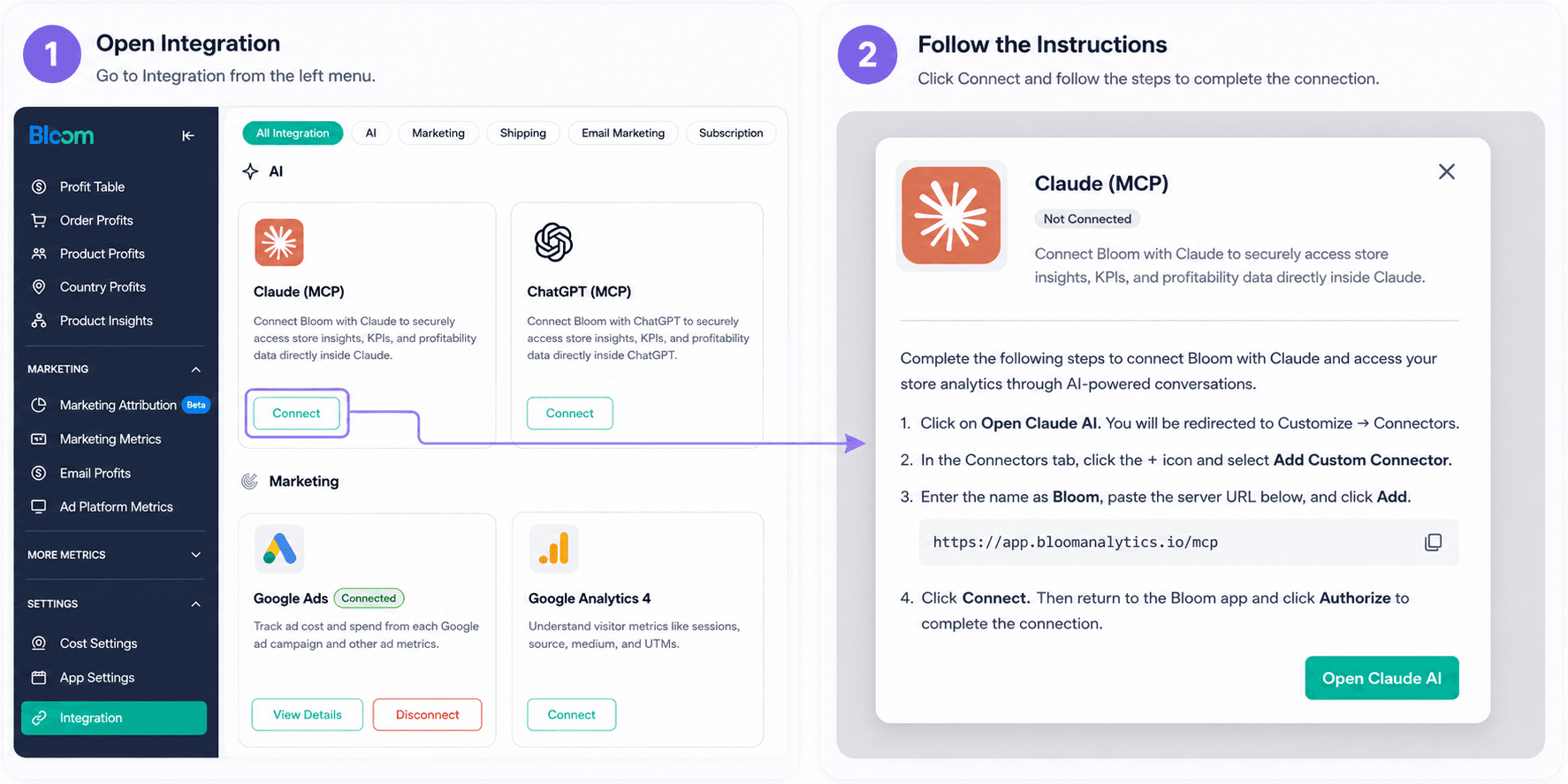
Go into Bloom and click Open Claude AI. That takes you straight to Claude's Customize > Connectors page.
On the Connectors tab, click the + icon, then Add Custom Connector.
Enter the name as Bloom, paste the server URL from your Bloom account:
https://app.bloomanalytics.io/mcpClick Connect, then head back into Bloom and authorize it to finish the setup.
That's it. No terminal commands, no JSON config files, no server management. Once you're authorized, Claude can start reading your store's profit data and you can start asking questions without opening a dashboard or filtering a report.
Verify it's working
After connecting, try a simple test prompt in Claude: "Show me my net profit for last month from Bloom." If Claude pulls real numbers and responds with a breakdown, the connection is live. If it asks you to connect a data source, double-check the authorization step in Bloom.
What Can Claude Actually Tell You About Your Store's Profitability?
Claude reads the profit picture Bloom has assembled, reasons through it step by step, and answers in plain language. It doesn't just return a single number. It cross-checks revenue against the costs Bloom brings in, compares the period you asked about to your history, names the drivers behind the change, and flags when something looks off or incomplete.
In our experience, the value isn't in the numbers themselves (you could find those in the dashboard). It's in how fast Claude connects them. A question that would take 20 minutes of cross-referencing reports takes seconds.
Profitability health checks and period comparisons
Instead of pulling reports manually and stitching the story together yourself, you can ask Claude to do it. This is where most merchants start, and it's where the time savings are most obvious.
Try prompts like:
"Give me a profitability summary for last month."
"Compare this month to last month and explain the biggest changes."
"What should I be paying attention to right now?"
Claude will pull your revenue, costs, and margins from Bloom, compare them against the prior period, and walk you through what shifted. If your CM2 dropped while revenue held steady, it'll name the cost line responsible.
Scenario: "Use the Bloom tool to analyze why my revenue is increasing while net profits remain flat."

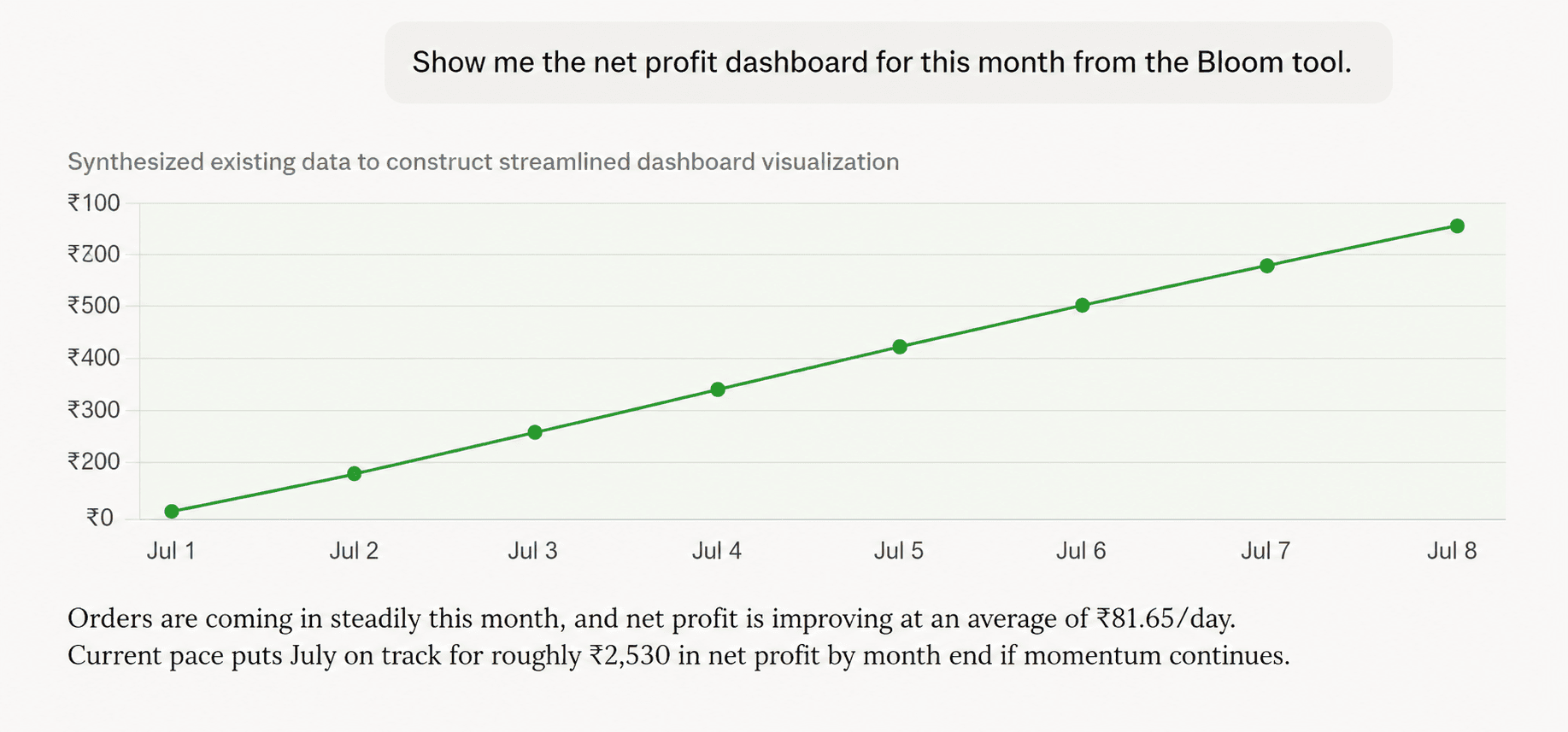
Scenario: "Show me the net profit dashboard for this month from the Bloom tool."
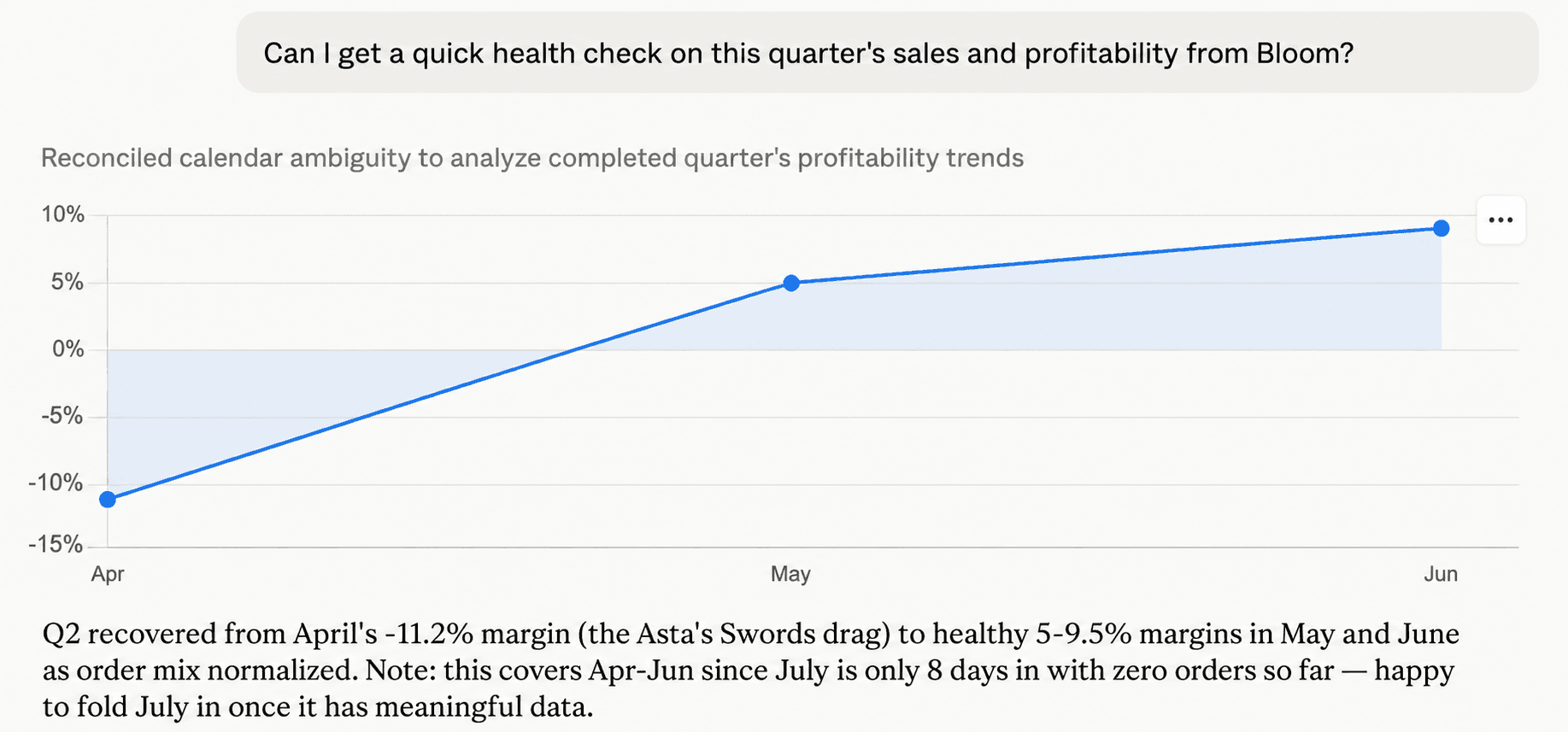
Scenario: "Can I get a quick health check on this quarter's sales and profitability from Bloom?"
Finding profit leaks and unprofitable products
Revenue can grow while profit falls. This happens more often than most merchants realize, usually because a handful of products or order types are quietly eating margin. Claude helps surface these by cross-referencing sales volume against cost data.
Try these:
"Which products are losing money after all costs?"
"Which orders were unprofitable last month?"
"What's reducing my profit the most right now?"
The answers here depend entirely on the quality of cost data in Bloom. If your COGS are entered correctly and your shipping data is connected, Claude can pinpoint the specific SKUs and cost lines dragging margin down. If cost data is missing, Claude will tell you it can't give a complete answer, which is actually useful in itself because it shows you where your data gaps are.
Evaluating marketing performance by channel
This is where connecting Bloom's MCP (rather than just Shopify's) makes the biggest difference. Shopify doesn't hold your ad spend data. It doesn't know your Meta CPAs or your Google ROAS. Bloom pulls that in through its ad platform integrations and its first-party Bloom Pixel attribution.
That means you can ask Claude:
"Which channels are the most profitable after ad spend?"
"Which campaigns should I scale based on contribution margin?"
"What's my blended ROAS across Meta and Google this month?"
Claude can compare attributed revenue against spend to surface which campaigns are actually generating profit, not just revenue. This is the jump from "this campaign had the most sales" to "this campaign generated the most profit per dollar spent."
Comparing performance across segments
Claude can also slice your data across products, channels, time periods, and customer groups without requiring you to build separate reports.
"Which products had the highest profit margins last month?"
"How much profit am I making per order?"
"Which sales channel delivered the best contribution margin this quarter?"
These comparisons would normally require pulling multiple reports and lining them up in a spreadsheet. With Claude reading from Bloom, you describe the comparison you want and get the answer back in one response.
What Are the Limits of Using Claude for Shopify Profit Analysis?
Claude is a powerful reasoning tool, but it's not magic. Knowing where it falls short matters just as much as knowing what it can do.
It can't fix bad data. If your COGS are wrong in Bloom, Claude's margin calculations will be wrong too. It works with the numbers it's given. Before trusting any profit answer, make sure the underlying cost data is accurate and complete.
It doesn't replace accounting. Claude can tell you a product is losing money after costs, but the decision to discontinue it, reprice it, or renegotiate supplier terms is yours. It's an analyst that delivers findings instantly. You and your team decide what to do about them.
It can miss context it can't see. If a one-time event drove a cost spike (a bulk reorder, a warehouse move, a seasonal shipping surcharge), Claude won't know about it unless that context is in the data. You still need to bring judgment to the conversation.
It reasons well, but it can reason wrong. Claude does multi-step reasoning across several data points at once. That's its strength. But complex reasoning chains can occasionally produce a wrong conclusion, especially when data is sparse or ambiguous. Treat its answers as a strong starting point for investigation, not as the final word.
Think of Claude as the fastest analyst you've ever worked with. It reads everything, connects the dots quickly, and explains its thinking. But you're still the one who signs off.
Does Claude or ChatGPT Work Better for Shopify Profit Analysis?
Both work well, and the honest answer is that the quality of the insight depends more on the data connection than on which model you pick. Bloom's MCP connects to both Claude and ChatGPT, so you get the same profit data either way.
Where they differ is in how they handle the conversation. Claude tends to be stronger at longer, multi-step reasoning chains, the kind where you ask "why did this happen" and it needs to cross-reference several data points to build an explanation. ChatGPT is popular for quick back-and-forth questions and tends to be snappier on simple lookups.
From what we've seen, most merchants settle on whichever they're already paying for. There's no wrong choice. If you want to try both, you can. We cover the ChatGPT setup and workflow in a separate guide.
Frequently Asked Questions
Is it safe to connect Claude to my Shopify store data?
Yes, when you use a secure protocol like MCP and authorize the connection yourself. You control which tools Claude reads from and can revoke access anytime. Claude reads data to answer questions. It doesn't modify your store, place orders, or write back to Shopify.
Do I need coding skills to connect Claude to Shopify through Bloom?
No. The entire setup is guided, no terminal, no API keys, no config files. If you can install a Shopify app and follow a few setup screens, you have all the skill required. The connection takes a few minutes.
What is a Claude Shopify MCP connection in plain terms?
It's a secure link that lets Claude pull live numbers from your Shopify store and analytics tools whenever you ask a question. Instead of exporting a report and pasting it into a chat, you connect once through Bloom and Claude reads directly from your data going forward.
Can I use Bloom's MCP with ChatGPT too?
Yes. Bloom's MCP server works with both Claude and ChatGPT. The data is the same either way. Pick the AI tool you already use, or try both to see which conversation style you prefer.
Can Claude replace my analyst or bookkeeper?
No. Claude reads and explains data fast, but it doesn't replace strategy, judgment, or proper accounting. It tells you a product is losing money after costs. The decision to discontinue it, reprice it, or renegotiate shipping stays with you and your team.
Discover More